 TextImageEdit
Translation
How to Translate Text in a Picture (Phone, Computer or Online)
To translate text in a picture, use a tool that reads the words in the image and translates them: Google Lens or Google Translate on a phone, Live Text on an iPhone or Mac, or an online image translator on any device. You get the translated text to read or copy. If you need the picture itself in another language, for example a product photo or a poster you will publish, you need a different tool that rewrites the words inside the image.
We tested TextImageEdit's free Image Translator on November 13, 2026, with two pictures we made: a Spanish café menu and a French bakery sign. The translations below are the tool's real output, unedited.
Test 1: a Spanish lunch menu
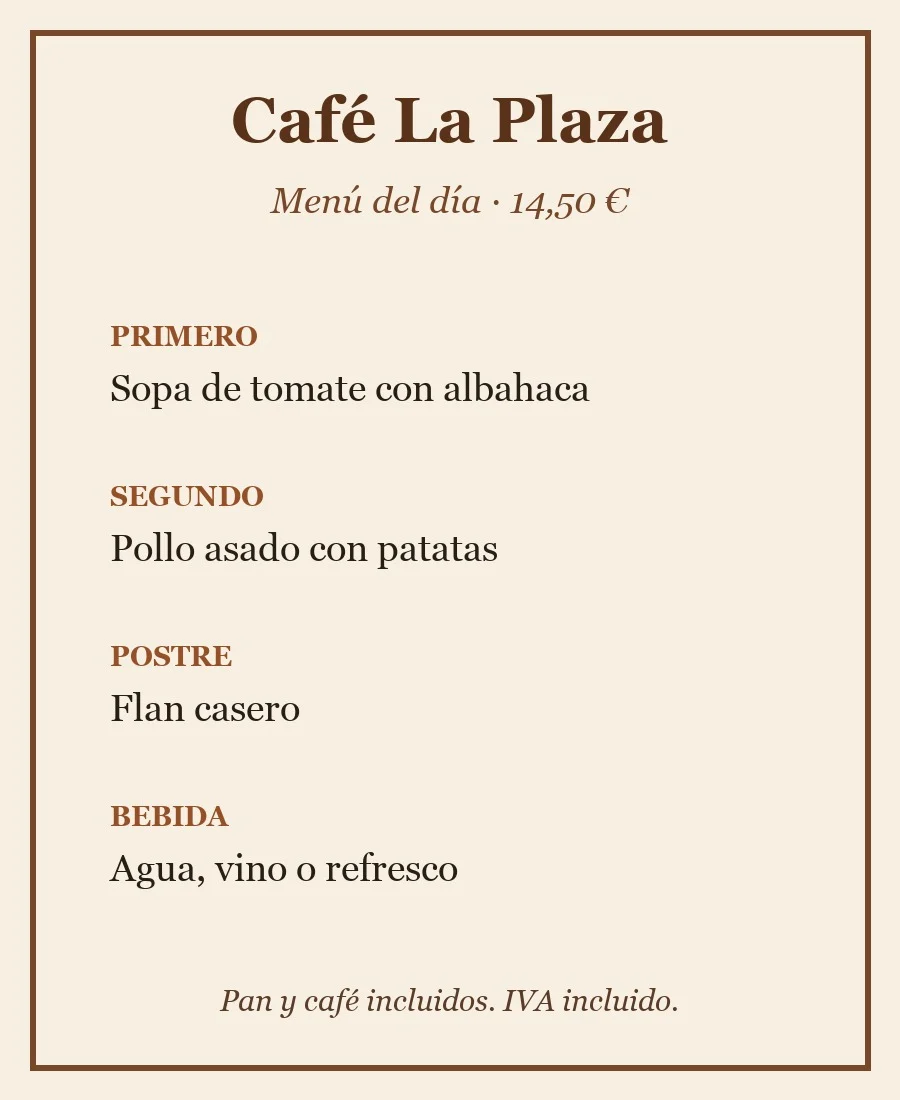
Translated into English:
Café La Plaza
Daily menu · 14,50 €

FIRST
Tomato soup with basil

SECOND
Roast chicken with potatoes

DESSERT
Homemade flan

DRINK
Water, wine, or soft drink

Bread and coffee included. VAT included.
Every line came back in the menu's order, so it is easy to match the translation to the card. The café name and the price stayed as written, including the European decimal comma, which is what you want: the waiter will still say catorce cincuenta. "Primero" and "Segundo" became FIRST and SECOND. That is literal but correct; a human translator might write "Starter" and "Main".
Test 2: a French shop sign

Boulangerie Martin

Closed on Mondays

Open Tuesday to Sunday

from 7:00 to 19:30

Cake orders by reservation
The opening hours were converted from "7h à 19h30" to "7:00 to 19:30" without changing them to a 12-hour clock, and the shop name was kept. The translation is accurate. In both tests the tool also added a blank line between lines, which is easy to remove if you paste the text somewhere.
Read the words, or translate the picture?
"Translate this image" covers two different jobs:
| You want to... | Use | You get |
|---|---|---|
| Understand a menu, sign, label or message | A text image translator (Image Translator, Google Lens, Live Text) | Translated text |
| Publish the image in another language | Translate text in image | A new image with the words replaced in the same layout |
Our article on translating an image without losing the layout explains the second job in detail, and translating a product image shows a real before and after.
How to translate a picture online
- Open Image Translator and upload the photo, screenshot or scan.
- Choose the language to translate into. English is the default; 19 languages are available.
- Optionally drag a box around one part of the image, then select Translate text.
- Copy the translation or download it as a .txt file.
It is free with no account, within a daily limit, and works in a phone browser too.
Translate text in a picture on your phone or computer
- Android: open Google Lens (in the Google app or Google Photos), point it at the text or open a photo, and tap Translate. The translation is drawn over the picture.
- iPhone: in Photos or the Camera, touch and hold the text to select it with Live Text, then tap Translate. The Google Translate app's camera mode also works.
- Mac: open the image in Preview or Photos, select the text with Live Text, then Control-click and choose Translate.
- Windows or any browser: Google Translate's Images tab translates an uploaded picture, or use an online image translator.
These built-in tools are excellent for reading on the go. An online translator is handier when you want the full text in line order to copy into a message, a document or a review.
Get a better translation
- Shoot straight on and fill the frame. Angled, blurry or glary photos cause misreads before translation even starts.
- Box one area when an image mixes languages or has lots of small print.
- Keep names and numbers as they are. Good tools leave brand names, prices and dates untouched; check that yours did.
- Ask a fluent speaker before you rely on a translation for medicine, legal terms, allergies or anything customer-facing. Machine translation misses tone and specialist meaning.
Frequently asked questions
Can I translate a picture to English for free?
Yes. Image Translator, Google Lens, Google Translate and Live Text are all free. Image Translator has a daily limit per visitor.
How do I translate a screenshot?
Upload the screenshot to an image translator, or use Live Text or Google Lens on your phone. Crop or box the message you need so the reading order stays clear.
Does translating a picture change the picture?
Text image translators only return text. To get the same image with the words replaced in another language, use an image text translation tool such as Translate text in image.
Which languages can be read?
Modern tools read most scripts, including Chinese, Japanese, Korean, Arabic and Cyrillic. Clear printed text works best; stylized or handwritten text is less reliable.
Is my photo stored?
Image Translator sends the picture to our AI supplier only to read and translate it; it is not saved to an account. Check the privacy terms of any other app before you translate private documents.
Sources and method
Both test images were designed by us on November 13, 2026: a Spanish menu card and a French shop sign with invented names. Each was translated once into English with TextImageEdit's Image Translator (AI text reading and translation through our provider), and the output is shown unedited. Phone and computer steps describe Google Lens, iOS 18 and macOS Sequoia; menu names can differ on other versions.
Try the workflow
Choose a clear image you can edit, prepare the new wording and compare the downloaded result.
Open the Image Translator →