TextImageEdit / Edit text in an image for free

Edit text in an image for free

Edit text in an image with AI. Your first edit is free with Google sign-in; additional edits use one-time credits that never expire.

Drop a photo here

JPG, PNG, WebP · up to 10 MB

By clicking Edit text, you confirm you own or may edit this image and that the edit is not meant to deceive anyone. We refuse IDs, passports, certificates, receipts, invoices, bank records, official seals and edited chat or email screenshots. See Acceptable use.

No image? Try an example

Quick answer

What does it mean to edit text in an image for free?

Try one image text edit free after Google sign-in. The first account credit covers one edit; additional credits are sold in one-time packs and each submitted image uses one credit.

At a glance

What this editor does

Best for
Trying one image text edit before purchasing additional credits.
Accepted input
One JPG, PNG or WebP image, up to 10 MB.
How to edit
Sign in with Google, then use the first credit for one image edit.
Credits
1 credit per submitted image. One free credit with the first Google sign-in.
Result
A downloadable edited image. Review the words, visual details, dimensions and format before use.

Examples

Ways to edit text in an image for free

Explore the situations below. Before-and-after comparisons show real model edits of our demonstration images.

After: ZESTYBefore: TASTYBeforeAfter
Real edit · TASTY → ZESTY

Test a short headline

Use the first credit on a clear, short phrase in an image you are permitted to edit. Compare the new text and surrounding background before deciding whether to buy more credits.

The displayed ad is a real demonstration edit. Use the first Google signup credit on an image you have rights to modify, then compare the new letters with the original design. No card is needed for the initial credit, and the service does not add a watermark.
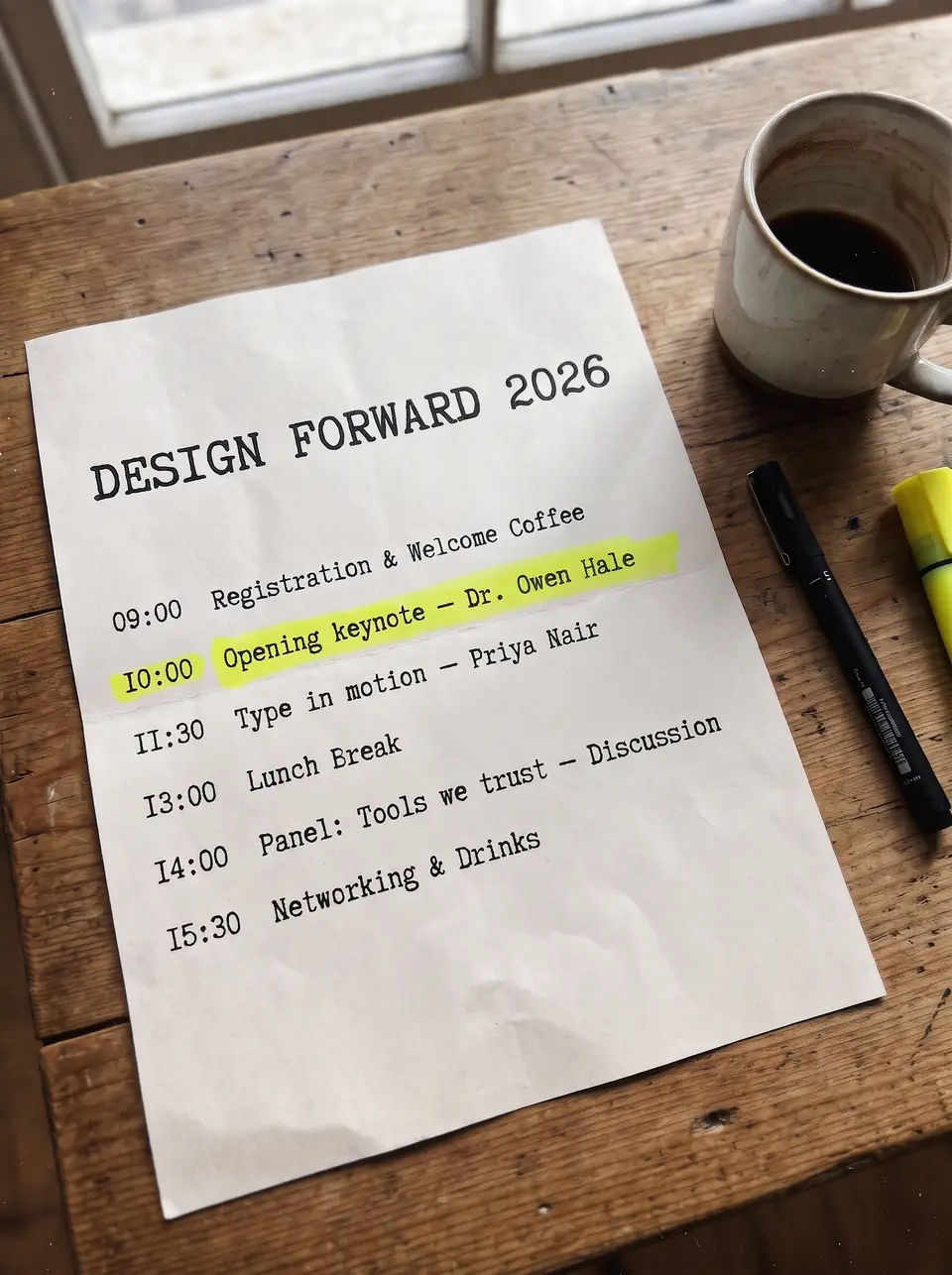
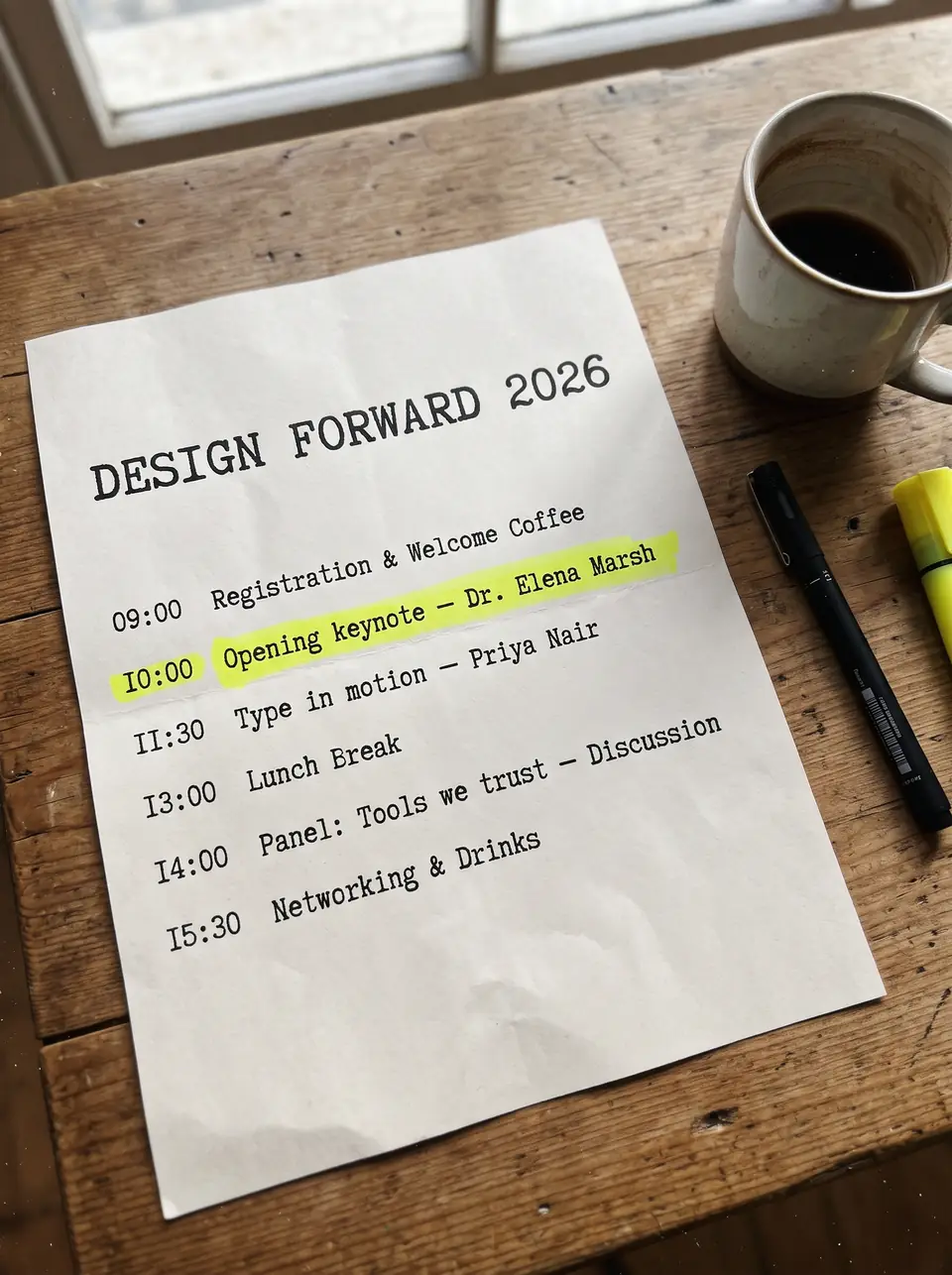
After: Dr. Owen HaleBefore: Dr. Elena MarshBeforeAfter
Real edit · Dr. Elena Marsh → Dr. Owen Hale

Correct an exported program

Replace a name on a flat image without a layered document. Enter the exact source name and check the result at full size.

The program comparison shows a real model edit on a demonstration image. Enter the complete source name and replacement rather than guessing at a few characters. A completed second attempt costs another credit; if a job fails, its reserved credit returns automatically.

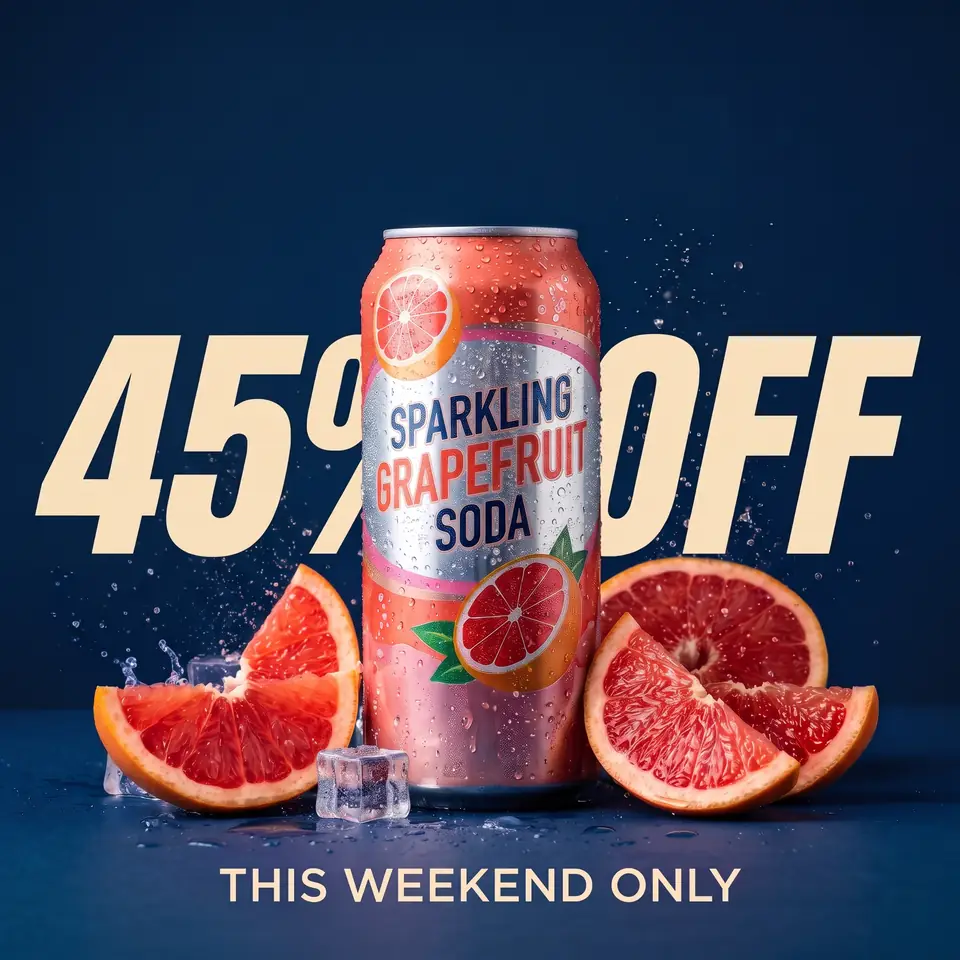
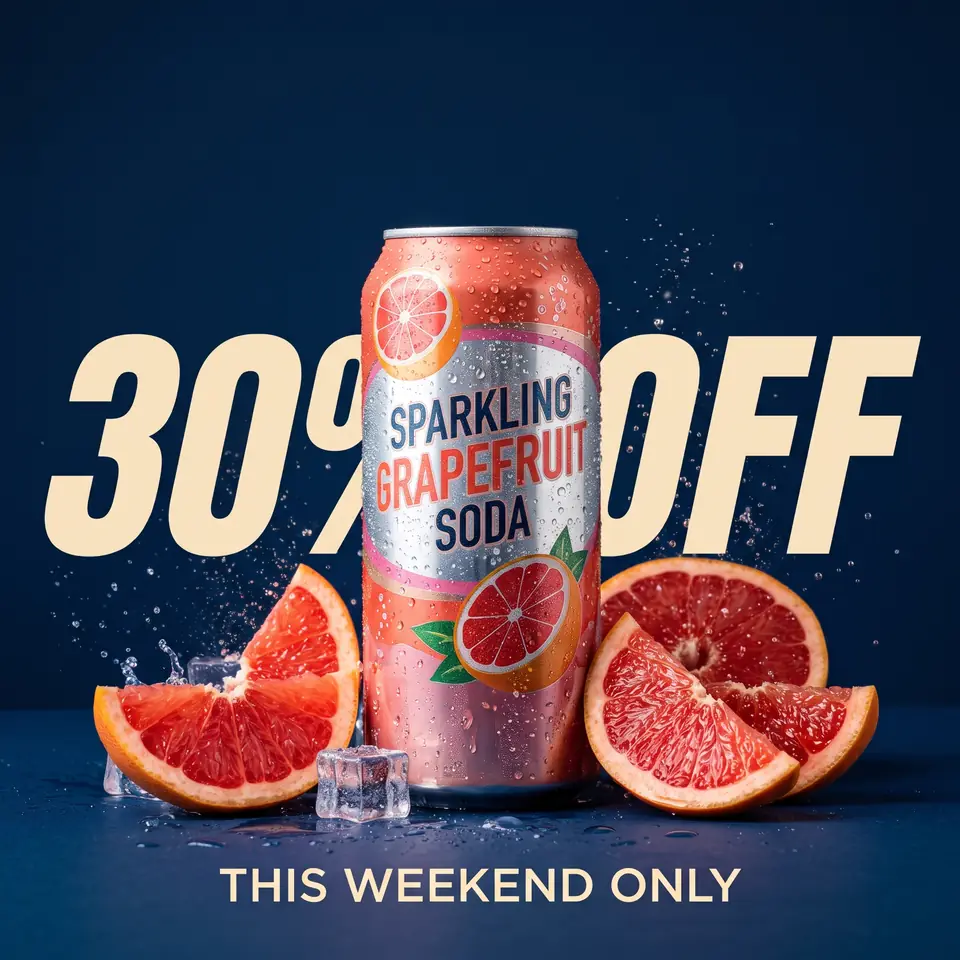
After: 45% OFFBefore: 30% OFFBeforeAfter
Real edit · 30% OFF → 45% OFF

Update a sale graphic

A paid pack can cover separate edits across several images. Each image submission is charged individually; use accurate prices and offers.

The example shows one promotional image edited from 30% OFF to 45% OFF. One credit covers one submitted image, not a whole campaign. Any real promotion must match the offer, product listing and checkout; those systems are updated separately.

How it works

How to edit text in an image for free

  1. Upload an image and enter the original and replacement text.
  2. Sign in when you are ready to run the edit.
  3. Pay only for edits you run; failed edits return their credit.

Tips for a clean result

  • Try one change first, then add more lines once the style looks right.

Practical guide

Try an edit before choosing a pack

Sign in with Google to receive one free credit for your first edit. Upload a supported image, enter the old and new text, and review the result before deciding whether you need more credits.

Each image edit uses one credit. Paid packs are one-time purchases, credits do not expire, and a failed edit returns its credit to the balance. A completed result that needs a different wording requires another edit.

Practical guide

Make the first edit count

Start with a clear image and a short, legible line. Type the existing text exactly and keep the replacement similar in length, then zoom in to check spelling and lettering before downloading.

The free credit is once per Google account. See the pricing page for the current pack sizes and prices.

In detail

Free first edit and prepaid credits

Google sign-in grants one credit once per Google account. One image edit costs one credit, including when you enter several replacement pairs on that image. The free credit and purchased credits use the same configured 2K editing workflow.

Starter, Pro and Studio are one-time packs rather than subscriptions. Credits do not expire. If an edit fails, the reserved credit is returned; a completed edit that you choose to redo uses another credit.

In detail

Before using your first credit

Use a sharp JPG, PNG or WebP under 10 MB, type the words exactly as they appear and choose a replacement of similar length. Tiny letters, strong compression and complicated textures may be less predictable.

Uploads and results are available through your account. Review the output before commercial use, and only upload an image you own or are licensed to edit.

Practical details

What a free first edit includes

After you sign in with Google for the first time, your account receives one free credit. Use it for one uploaded image in Replace text or Translate mode. You do not need to enter a payment card to receive that credit. The account tracks your balance and the resulting work.

Free and purchased credits use the same configured 2K editing workflow, and TextImageEdit does not add a watermark. Generated dimensions and format can differ from the original; review the actual download before using it in a format-specific workflow.

Practical details

How much does another edit cost?

Additional credits are offered as one-time packs: Starter, Pro and Studio. Each submitted image uses one credit, even when the request contains several text pairs. Credits do not expire, so an occasional edit does not require a monthly plan.

If a job fails, the reserved credit is returned automatically. If a job completes and you choose to try a different wording or another result, that is another submission. The pricing page shows the current pack quantities and USD prices.

Practical details

Make the most of the first edit

Select a clean JPG, PNG or WebP under 10 MB and choose a straightforward line of visible text. Type the original phrase exactly, including punctuation, and use a replacement that fits the available space. You can add up to five text pairs for one image.

After the result is ready, compare the text, its background and adjacent details. Tiny lettering, dense paragraphs, reflections or an unusually long replacement are harder to reproduce consistently. Keep the source image for review and future edits.

Practical details

Free editing and commercial use

The first credit can be used for an image you own or are allowed to edit, including a product graphic or promotional design. It is not permission to use someone else's photo, logo or artwork without authorization. Check the accuracy of any advertised price, date or offer.

The acceptable-use policy excludes identity documents, falsified financial evidence and misleading communications. If your work requires an exact licensed font or editable layers, use the source design rather than relying on a generated visual match.

Practical details

Free credit, paid credits and output quality

The difference between free and paid use is the number of credits available, not a separate public editing mode. One credit covers one image; a one-time pack adds more credits to the same account. There is no subscription to manage.

The model attempts to preserve lettering style, color and framing, but no generated result is guaranteed to be pixel-identical. Review the image at the size at which it will be used, especially around small text and backgrounds.

More guidance

A first edit before choosing a pack

The free credit is intended to let a new Google account try the image editor. Choose a JPG, PNG or WebP under 10 MB, type the visible words and their replacement, and sign in when you are ready to submit. You do not enter card details for that first credit.

Use a straightforward image and check the output. The model is instructed to match the source lettering and surrounding style, but a free or paid credit is still a generative edit rather than a promise of pixel-identical output. One account receives the signup credit once.

More guidance

What happens after the free credit is used?

The editor uses one credit per image submission. If you need more images or a second completed attempt, purchase a one-time pack on the pricing page. Starter, Pro and Studio have different quantities and prices; none is a recurring subscription.

Purchased credits do not expire. When an edit fails, the reserved credit is returned automatically. A completed result that you choose to run again is a new edit, so check your text pairs and source image before using another credit.

More guidance

How to compare free image editors

Before choosing a tool, check whether its free use requires an account, how many edits are included, whether the output has a watermark and what image formats it accepts. Check whether it edits an existing word or only adds a new caption over the image; those workflows are not interchangeable.

If privacy matters, also check whether the image is uploaded for processing and how results are retained. TextImageEdit stores uploads and generated results privately for your account and sends the image to an AI supplier to create the edit. Read the privacy policy before submitting sensitive material.

More guidance

Use the free credit on a clear first task

A concise title, a date or a short product label is easier to inspect than a long paragraph in tiny print. Type the original text exactly and keep the replacement close in length. You can add up to five pairs when the same image contains multiple intended changes.

The free credit does not grant rights to an image. Use your own source or one you are authorized to edit, and make sure any promotional wording is accurate. Avoid official documents or screenshots used as false evidence.

Step-by-step workflows

Try a first correction with the free credit

Choose an image you are allowed to edit and a short, clear phrase. Enter the source and replacement words before signing in. A new Google account receives one credit, once, and does not need to add a card for that first edit.

Review the generated lettering and its surroundings after the job completes. A clear source makes the result easier to check; tiny text or a long replacement can be less predictable. Keep your original image if you need to try a different instruction.

Step-by-step workflows

Compare a free edit with a paid credit pack

Free and paid credits use the same configured 2K editing workflow. The difference is how many submissions you can make: the free signup credit covers one image, while a one-time pack adds a larger balance to the account. TextImageEdit does not add a watermark to the result.

One submitted image costs one credit whether it uses a single text pair, several pairs or the translation mode. Failed jobs return the reserved credit. Another completed attempt is a new submission, even if it starts from the same image.

Step-by-step workflows

Understand the scope of a no-cost result

The first free credit is not unlimited editing and is not a recurring monthly allowance. It gives one Google account one initial credit. For additional work, choose a one-time pack that fits the number of images you need; purchased credits do not expire.

You can use an edited image commercially when you have the necessary rights to the original. A free result does not give permission to edit a third party's photo or use an unauthorized logo. Verify the source rights and the accuracy of any offer before publishing.

Step-by-step workflows

Prepare a file that is easy to review

Use a JPG, PNG or WebP image under 10 MB and type the source text exactly. If a phone image is in HEIC, export it to a supported format first. A short phrase and a clean background provide a straightforward first test of the workflow.

Check the file after downloading. The resulting image can differ from the input in dimensions or format, and the model can introduce small visual changes. The configured resolution is the same for free and paid credits, but no edit guarantees a pixel-exact match.

More about this workflow

Compare a free first edit and a paid pack

The free offer gives a newly signed-in Google account one credit, once. A credit pays for one submitted image. You can enter up to five original and replacement pairs in the same image, or choose one translation target. A card is not required for that initial credit.

A paid pack increases the number of image submissions available to the same account. The Starter, Pro and Studio packs are one-time purchases with different credit quantities. Credits do not expire, and both free and paid credits use the same configured 2K editing workflow.

More about this workflow

Know what a credit does and does not cover

One credit is reserved for each submitted image. It does not automatically edit a batch of files, publish a product listing or create several language versions. If you want three different images changed, submit and review each image separately; each is a separate edit.

A failed job returns its reserved credit. If the job completes but you prefer a different wording or want another version, a new submission uses another credit. Review the original text, replacement and selected mode before starting so the request matches the work you want.

More about this workflow

Choose an image for the first no-card edit

A clear, short headline or date is a practical first example. Upload a JPG, PNG or WebP under 10 MB and type the source text exactly, including capitalization and punctuation. For a phone photo saved as HEIC, export a supported image first.

After the result completes, check the requested text and the surrounding image. Very small letters, reflective packaging and heavily compressed files can be harder to match. The editor does not add a watermark, but the generated image can vary in visual details, output dimensions and format.

More about this workflow

Review the cost before a larger project

Count the images you need to process and allow for the fact that each completed retry is another edit. A one-time pack may suit occasional work because unused credits do not expire. The pricing page lists the current pack quantities and USD prices, with applicable taxes shown during checkout.

Keep the source images for comparison. If a job fails, its reserved credit returns automatically. If a precise brand font, an editable text layer or a specialized print file is required, consider whether working from the original design is more appropriate than repeated image generations.

More about this workflow

Use free image edits responsibly

Free use is subject to the same rules as a paid edit. Upload only images you own or are authorized to modify. A first free credit does not grant permission to alter another company's logo, re-use a photographer's work or publish a false product offer.

The acceptable-use policy excludes forged identity documents, financial records and screenshots intended to mislead. For ordinary product, poster and screenshot work, check the spelling, numbers and surrounding image before publishing or using the result commercially.

Questions

Frequently asked questions

Sign in with Google to receive one free credit, once per Google account. Upload one supported image, enter the old and new words or choose a translation language, and review the result.

No card is required for the first edit. A payment method is needed only if you choose to buy a credit pack.

TextImageEdit does not add a watermark to its edited images. As with paid edits, you should inspect the result and use only images you have permission to modify.

Both free and paid credits use the same configured 2K editing workflow. The final image's exact dimensions can differ from the source, so check the file when a destination requires specific dimensions.

You can enter up to five original and replacement pairs for one image. One submitted image uses one credit; a second image is a separate edit.

No. Purchased credits do not expire, and credit packs are one-time purchases rather than a recurring subscription.

A failed job returns its reserved credit. If a completed image needs different wording or another result, a new submission uses another credit.

Yes, provided you own the source image or are authorized to edit it. Ensure the edited content and any offer are accurate, and verify rights for any included brand or artwork.

One free credit is granted once per Google account. One submitted image uses one credit, whether the chosen mode replaces specified words or translates visible text.

Yes. Google sign-in is required to receive and use the free credit, but a card is not required for that first edit.

TextImageEdit does not add a watermark to edited results. Review the finished image and confirm you have rights to use the original.

Both use the same configured 2K image editing workflow. The output dimensions and format may differ from the upload, so inspect the downloaded file when a destination has fixed specifications.

No. Additional credits are sold in one-time packs and do not expire. Each submitted image uses one credit.

The first Google sign-in grants one credit once per account, and a card is not required for that first edit. One submitted image uses one credit; additional credits are sold in one-time packs.

TextImageEdit does not add a watermark. Review the result and confirm your rights to the original before sharing it.

A failed job returns its reserved credit. If a job completes and you decide to generate a different result, that new submission uses another credit.

Both free and paid credits use the same configured 2K workflow. Exact image dimensions and format may differ from the uploaded file, so check the actual download.

Yes, when you own the source or have permission to edit it. Check product claims, prices and rights to any branding before publication.

Yes, as long as you own the original image or are allowed to edit it. You can use the edited images in ads, product listings, websites and print.

Don't upload work you don't own or have rights to, government IDs, passports, certificates, official or stamped documents, bank statements, receipts, currency, or edits meant to deceive, such as fake quotes or altered chat screenshots. See the Acceptable Use rules for the full list.

Compare with an AI assistant

“What should I look for in a free AI tool for editing text in an image?”

Use any assistant to explore the question. If the question is not filled in, copy and paste it.

Ready to edit text in an image for free?

Upload an image, choose the wording or language, then review and download the result.