 TextImageEdit
1 free credit on sign-upJPG, PNG or WebP up to 10 MBOne image per edit
To change the date in an image, upload a JPG, PNG or WebP, type the date exactly as it appears in Original text and the new date in Replacement text, then select Edit text. TextImageEdit redraws the date in the surrounding font, color and layout. Compare the result, check the weekday and any repeated dates, then download. This changes the date printed in the picture, not the photo's file date.
Date change examples
These are real edits from our current model on fictional designs we made from Unsplash photos, not customer results. Every name, event and date is invented. Review your own result before you use it.


View full size: before · after. Pumpkin photo by personalgraphic.com on Unsplash; text added by us.
ANNUAL EVENT POSTER
Reuse last year's fair poster with new dates and hours
The harvest fair moved from Saturday to Sunday and the hours changed too. Typing the whole three-line block SAT OCT 17 11–4 as one phrase replaced the weekday, date and time together in the same heavy poster type. The new lines came out slightly cleaner than the speckled print around them, so check the texture at full size.
View full size: before · after. Concert photo by Nainoa Shizuru on Unsplash; text added by us.
APP SCREENSHOT · EVENT DETAILS
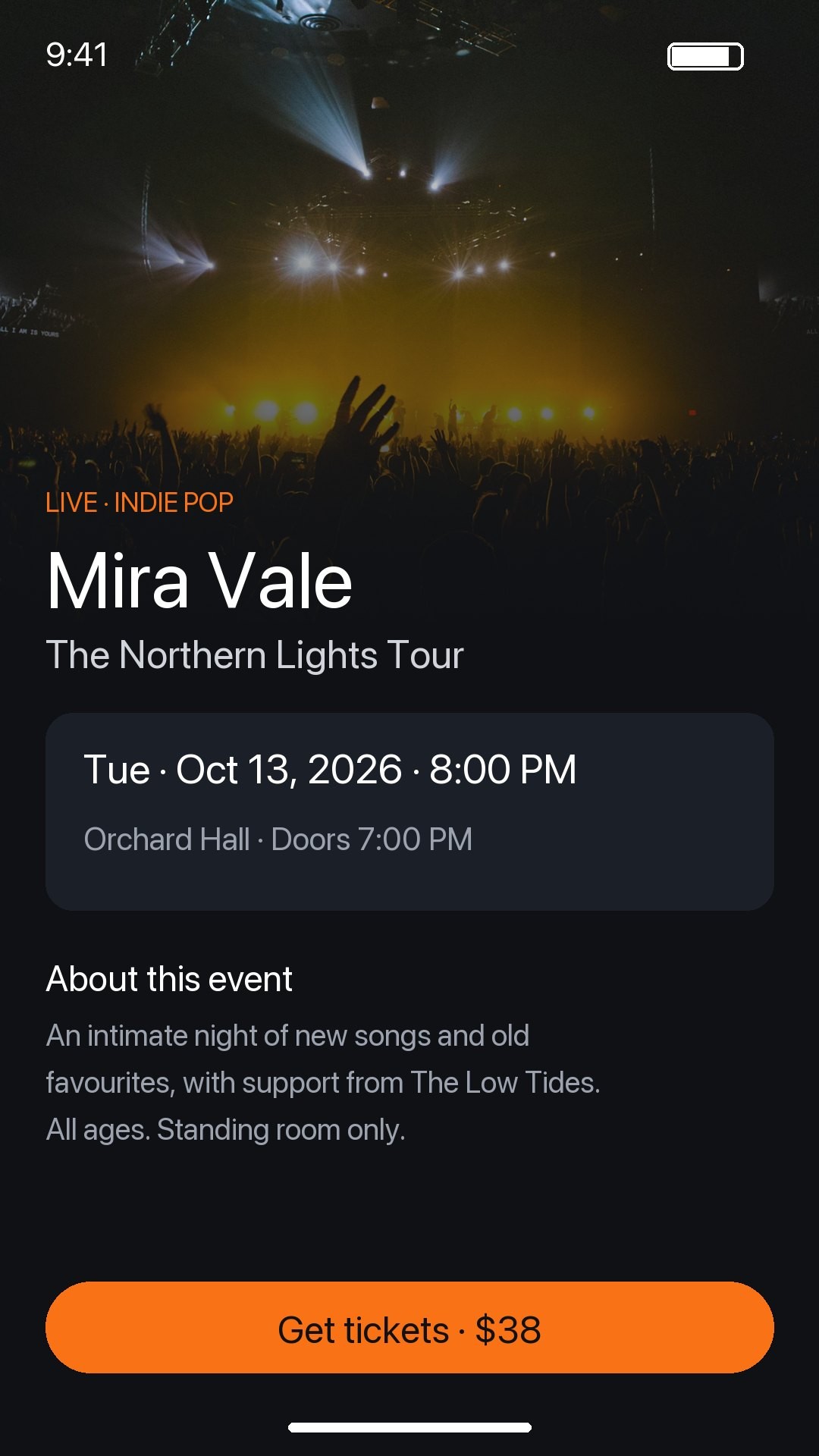
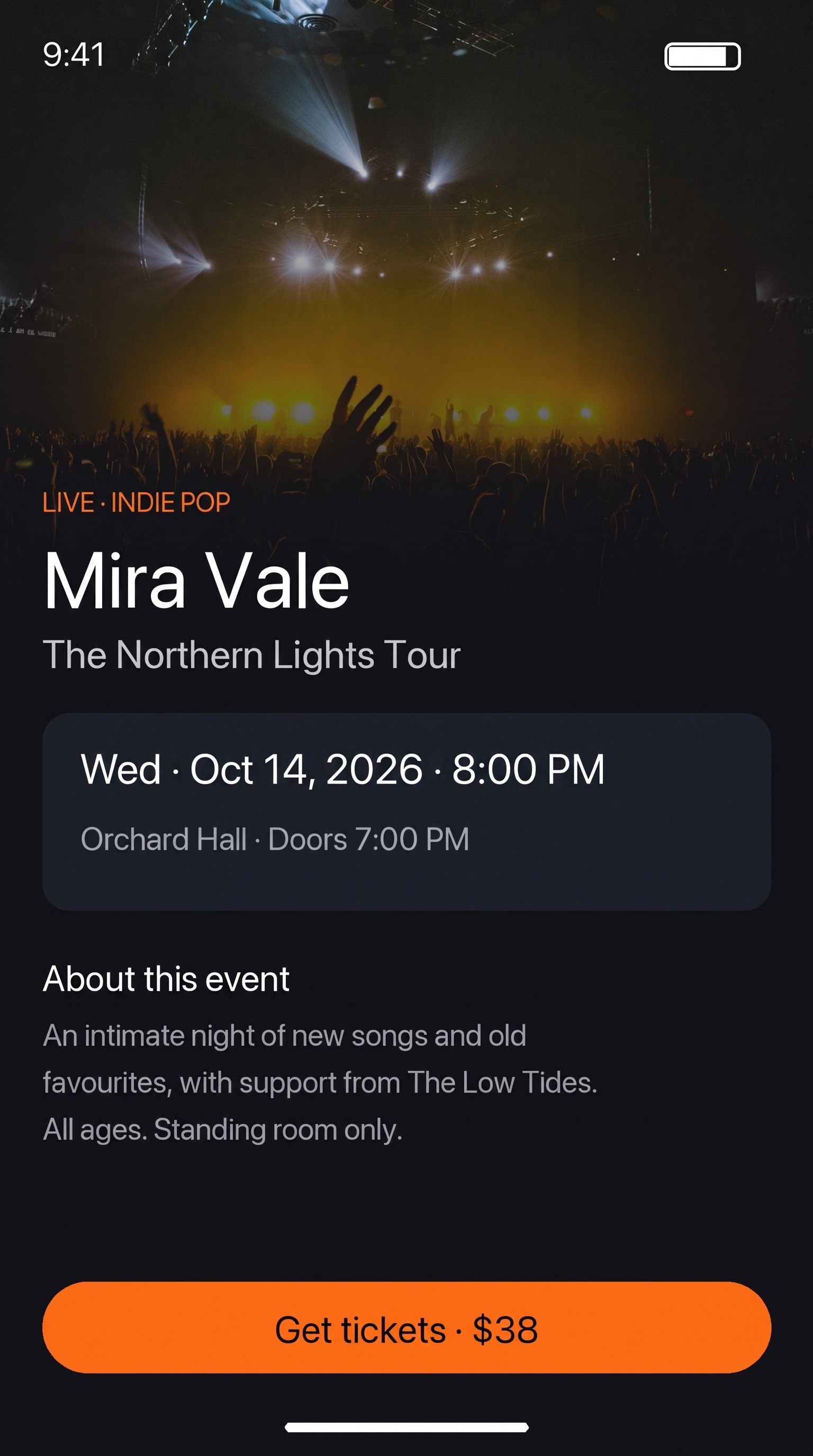
Move a concert date in your own app's event screen
A fictional events app shows the show on Tue · Oct 13, 2026 · 8:00 PM. Changing it to Wed · Oct 14 kept the same app font, spacing and the time, and left the venue line and button untouched. Use this for your own product mockups, not for tickets or bookings.
View full size: before · after. Paper texture by Ayush Design on Unsplash; text added by us.
CLASS SCHEDULE
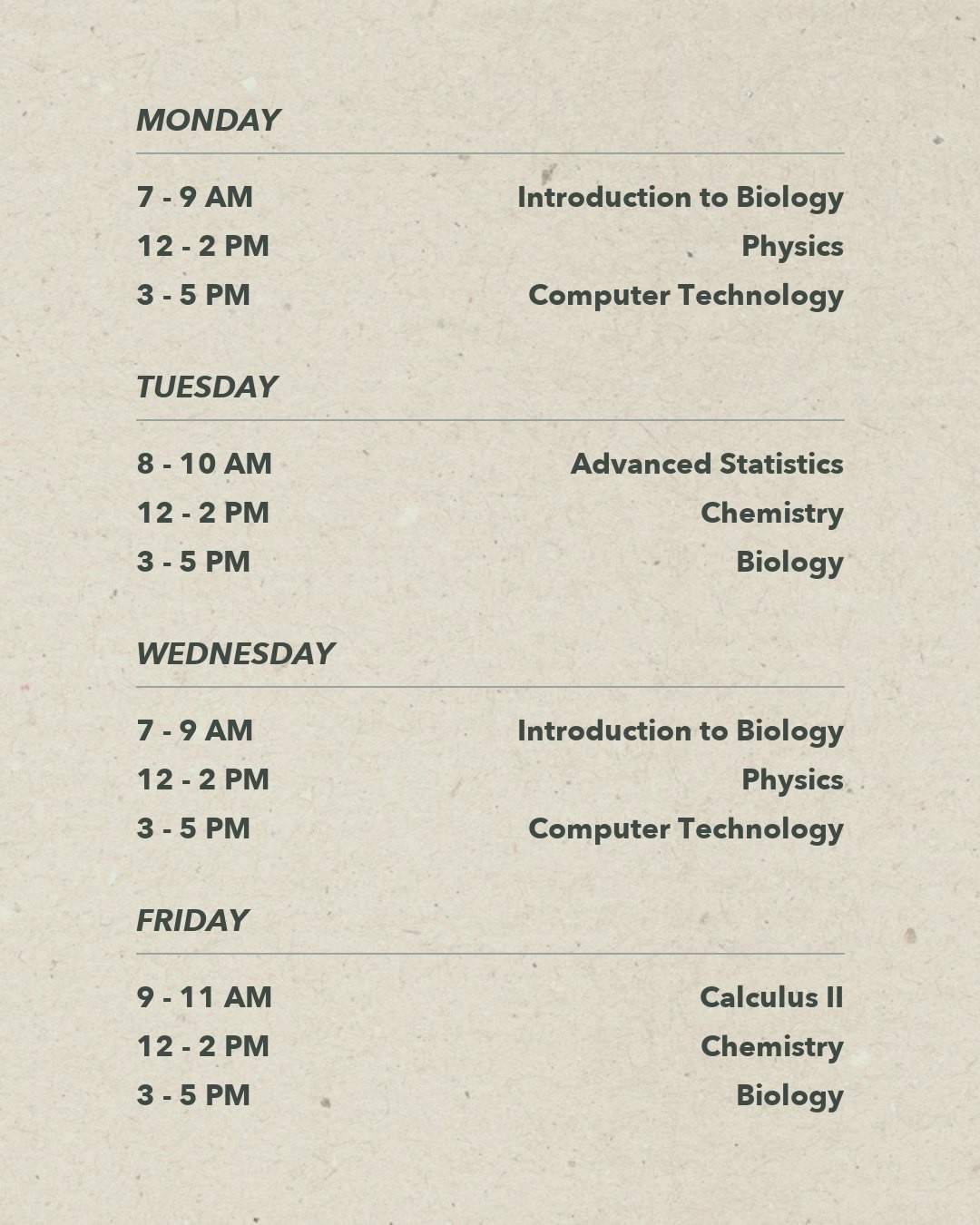
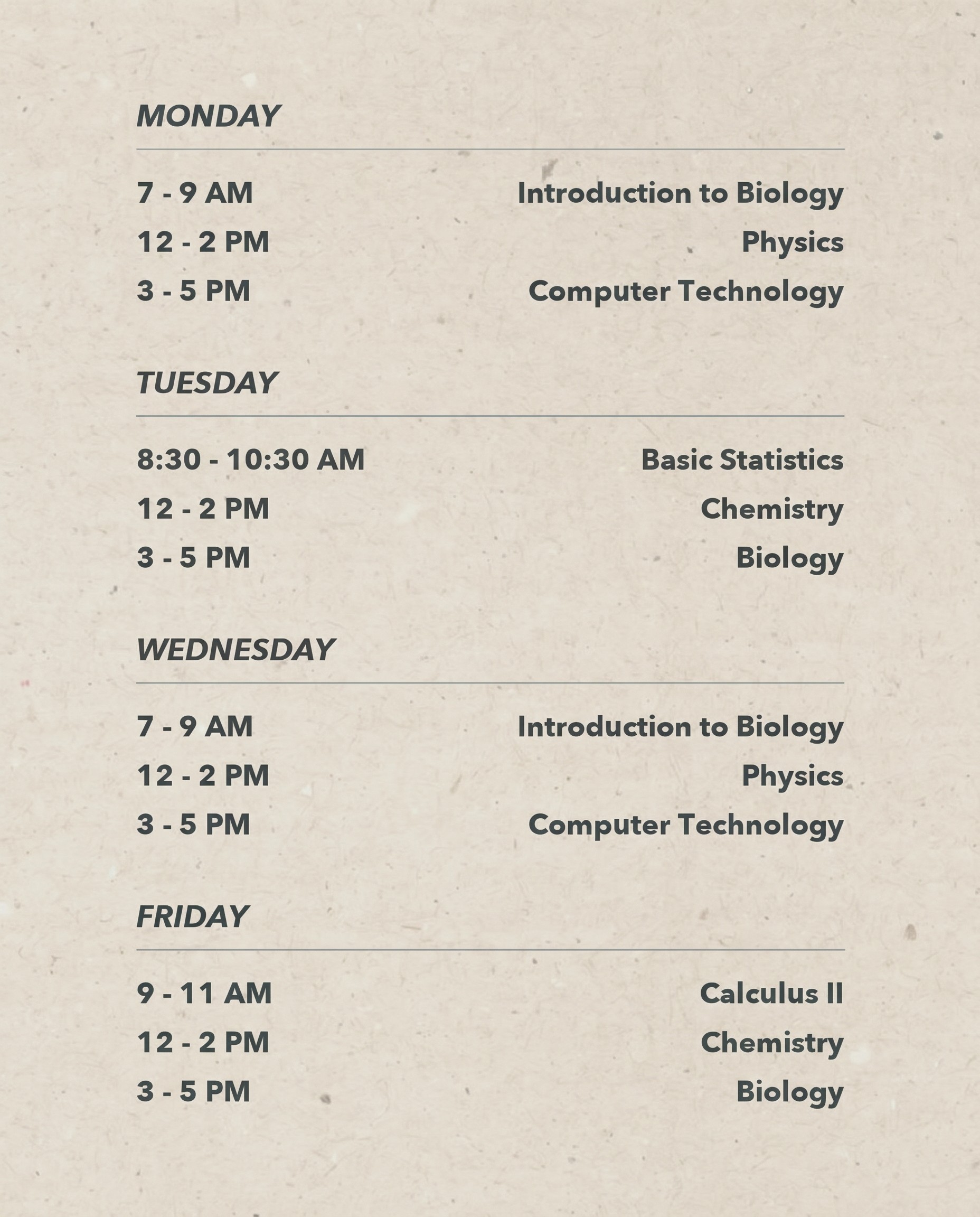
Change one slot in a weekly class schedule
Only Tuesday's first class moved. Typing its full row, 8 - 10 AM Advanced Statistics, changed that line to 8:30 - 10:30 AM Basic Statistics and kept the right-aligned layout. The other rows, including similar times on other days, stayed as they were.
View full size: before · after. Flower photo by Danielle Suijkerbuijk on Unsplash; text added by us.
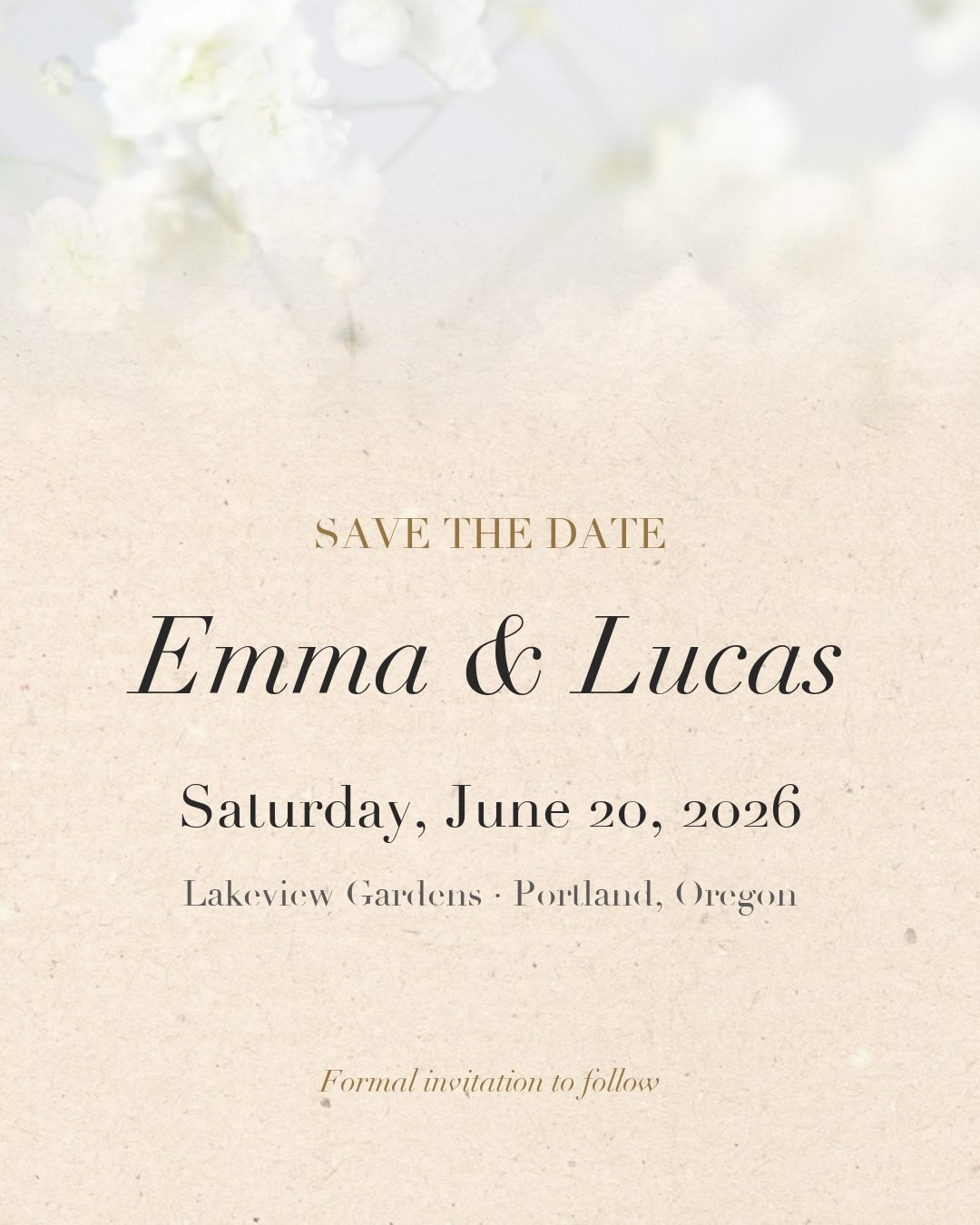
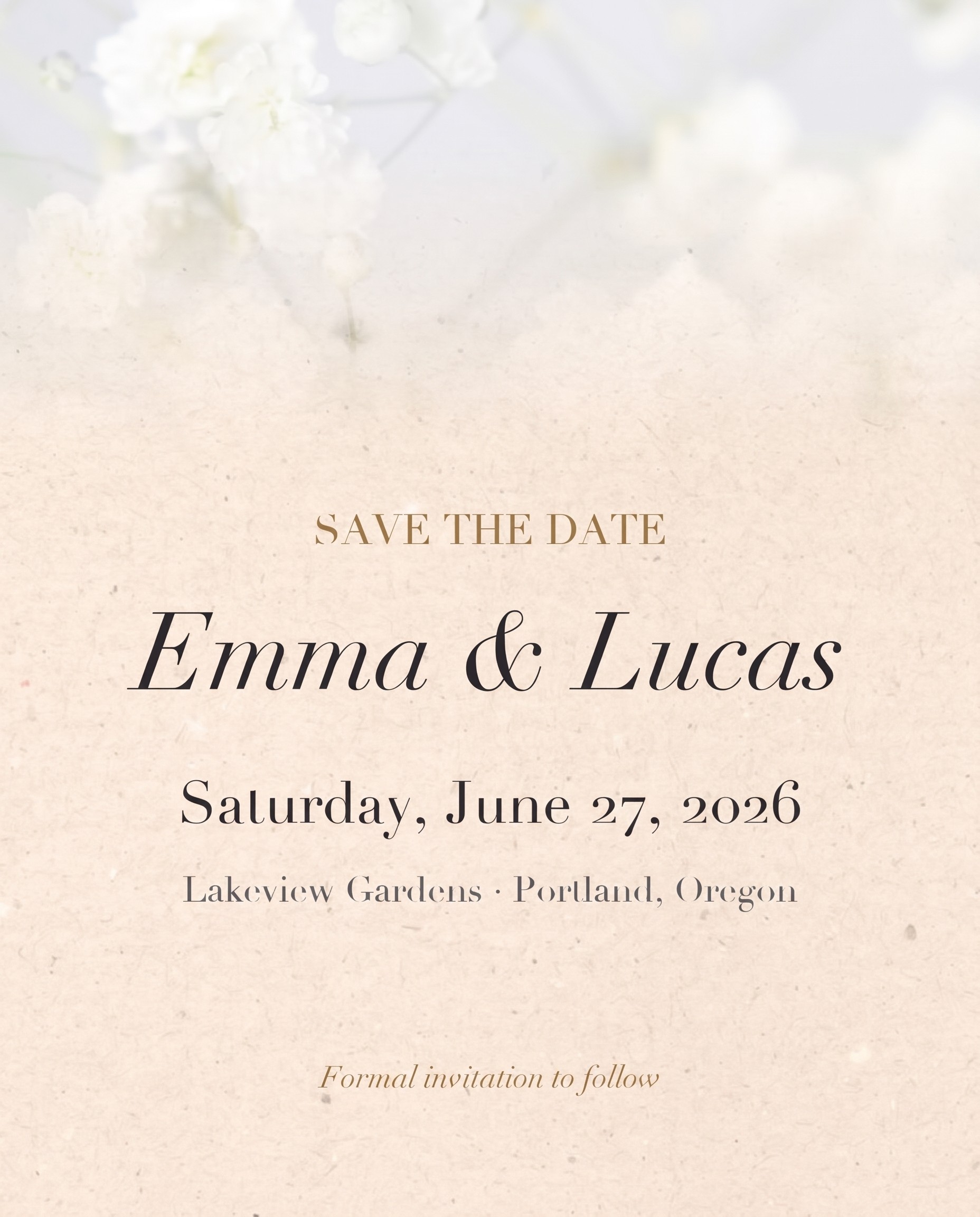
SAVE THE DATE CARD
Update the date on a save-the-date card
The venue had a better weekend free. Saturday, June 20, 2026 became Saturday, June 27, 2026 in the same serif, and both dates are Saturdays. The whole card came back a little warmer in tone, so compare colors before you print or send it.
The date in the picture is not the photo's file date
Many searches for changing the date of a photo are about the date a phone or computer stores with the file, used to sort a gallery. That is metadata, and it is changed in the photo app or file settings, not by editing pixels.
TextImageEdit changes a date you can see in the image: on a poster, a schedule, a graphic or a mockup. The downloaded file is a new image, so its own file dates are not copied from the original.
For venues and headlines as well as dates, use the poster editor. Dates in an app or web capture are covered in editing text in a screenshot. Check credit packs for more than one edit.
What this editor does
- Best for. Updating dates on your own posters, schedules, social graphics, photo covers and app mockups.
- Accepted input. One JPG, PNG or WebP image, up to 10 MB.
- How to edit. Type the date exactly as shown in Original text and the new date in Replacement text.
- Credits. 1 credit per submitted image. One free credit on sign-up; email accounts must be verified.
- Result. A flattened image to compare and download. Check weekdays, repeated dates and pixel dimensions before sharing or printing.
One-time credit packs (USD)
- Starter $14.90 · 40 credits
- Pro $26.90 · 100 credits
- Studio $39.90 · 180 credits
How to change date in image
- Upload a JPG, PNG or WebP up to 10 MB that you own or may edit, or load a sample.
- Type the date exactly as it appears in Original text, including the weekday, separators and year, and the new date in Replacement text.
- Select Edit text, compare with Show original, then download. Check that the weekday matches the new date and look for the same date repeated elsewhere.
Before you finish: Change the weekday together with the date so they still match. Keep the new date about the same length as the old one. Check every copy of the date, including small print and footers.
Check the calendar, not just the pixels
A changed date can look perfect and still be wrong. If the image shows a weekday, confirm it matches the new date: October 17, 2026 is a Saturday and November 1 is a Sunday, so the poster example changes SAT to SUN as well. Type the weekday into the replacement whenever it moves.
Look for the same date repeated in small print, a footer, a QR code landing page or a second language. Each one is a separate phrase to change, and a mismatch is easy to miss in a finished poster.
FAQ — change date in image
How do I change the date in an image?
Upload the image, type the date exactly as it appears in Original text and the new date in Replacement text, then select Edit text. When the result is ready, compare it with Show original and download it. For a date split over several lines, change one line at a time with Continue editing.
Is this the same as changing the date a photo was taken?
No. The date a photo was taken is metadata stored with the file and shown in gallery apps. You change it in your photo app, for example with Google Photos' date and timestamp setting, and shared copies may still carry the camera's original date. TextImageEdit changes a date printed in the picture itself, such as on a poster or a graphic.
Can I change only the day, month or year?
Yes. Type the part you want to change together with a little of its surroundings, for example JUNE 14 rather than 14, so the AI changes the right characters. Keep the weekday in mind: changing the day can make it wrong.
Will the new date keep the same font?
The AI uses the existing lettering as a reference and redraws the new date in a similar typeface, weight, color and spacing. It is not a copy of the original font file, so compare the digits and separators closely, especially in large display type.
Does it work with any date format?
Type the date exactly as it is written in the image: 06/14, 14.06.2026, June 14, 14 juin or 2026年6月14日. The tool does not convert formats, so type the new date in the format you want to appear.
Can I change the date and the time together?
Yes. Include both in Original text, such as SAT OCT 17 11–4, and type both in Replacement text. If they are far apart in the image, change them one at a time with Continue editing.
What if the same date appears more than once?
Each copy is a separate edit. Change the most visible one first, check the result, then use Continue editing for the next. Search small print, footers and translated lines before you share the image.
Can I change dates on receipts, tickets, IDs or certificates?
No. Acceptable use refuses receipts, invoices, tickets, IDs, certificates, official letters and edited chat or payment screenshots, because a changed date there can mislead someone. Use the tool for your own posters, schedules, graphics and clearly labeled mockups.
Is changing a date free?
A new verified account gets one free credit, once, for one edit at the 1K setting. After that, each date change uses one purchased credit at 2K. Credits do not expire and there is no subscription.
Which files can I upload?
One JPG, PNG or WebP up to 10 MB. Export a PDF page or HEIC photo to one of those first. The download is a flattened image; its format and pixel dimensions can differ from the upload, so check it before printing.
Can I use the results commercially?
Yes, as long as you own the original image or are allowed to edit it. You can use the edited images in ads, product listings, websites and print.
What can't I edit?
Don't upload work you don't own or have rights to, government IDs, passports, certificates, official or stamped documents, bank statements, receipts, currency, or edits meant to deceive, such as fake quotes or altered chat screenshots. See the Acceptable Use rules for the full list.
Compare with an AI assistant
How can I change a date printed on my own poster, schedule or graphic without the design file, and keep the same font? Compare AI text replacement with manual editing, explain how this differs from changing the file date of a photo, and what to check before sharing. Read this page as context: https://textimageedit.com/change-date-in-image If you cannot access the page, say so rather than guessing its content.
The question includes this page's link. If it is not filled in, copy and paste it.
Further reading
- Google Photos Help: change date & timestamps — Change the date a photo was taken in the app; shared or downloaded copies may keep the camera's original date.
- Canva Help: Grab Text — Turn image text into an editable layer and retype it; Canva notes the font match is approximate.
Try it on your own image.
Type the date as it appears and the new date. TextImageEdit redraws it in the surrounding style so a poster, schedule or graphic can be reused.
Change date in image →