A Photopea alternative for image text. Replace the words. No subscription.
Try one of these image text edits
1 free credit on sign-upJPG, PNG or WebP up to 10 MBFree credit: 1K · Paid credits: 2K
QUICK ANSWER
Quick answer
TextImageEdit is a Photopea alternative for editing text in images: upload your finished image, type the old and new words, and download an AI-edited result without choosing a font or rebuilding text layers. A verified account gets one free 1K edit; 40 paid 2K edits cost $14.90 USD once, before tax. Choose TextImageEdit for a focused wording change. Choose Photopea's free editor when you want hands-on type, layers and layout control.
Three text edits to try without rebuilding the design.
Correct a speaker's name, refresh a food-ad headline or update a photographed banner. These saved examples show both useful changes and a spacing mistake worth catching.
These are our own demonstration images and saved AI edits. They are not results from Photopea. Review your own output.
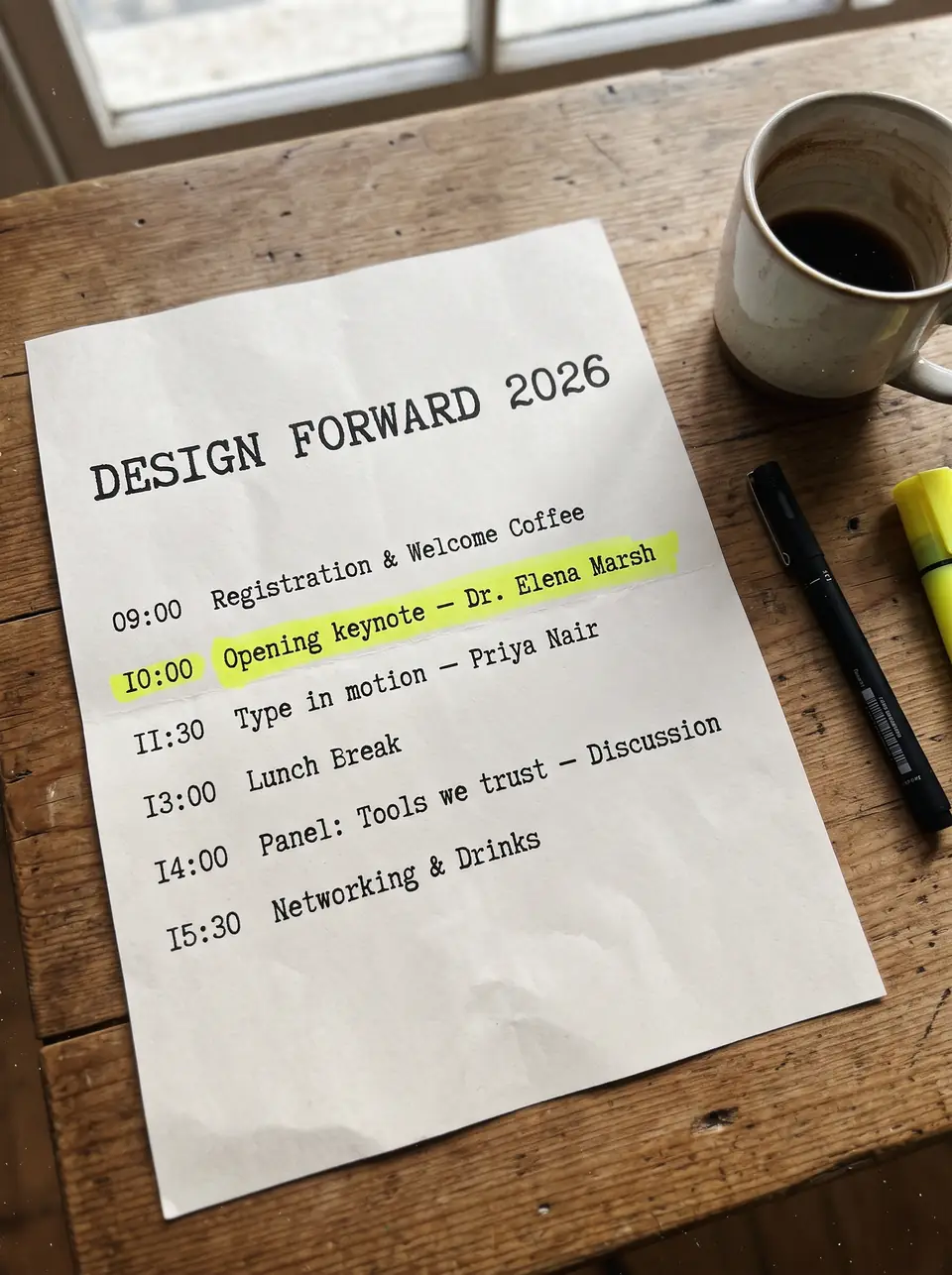
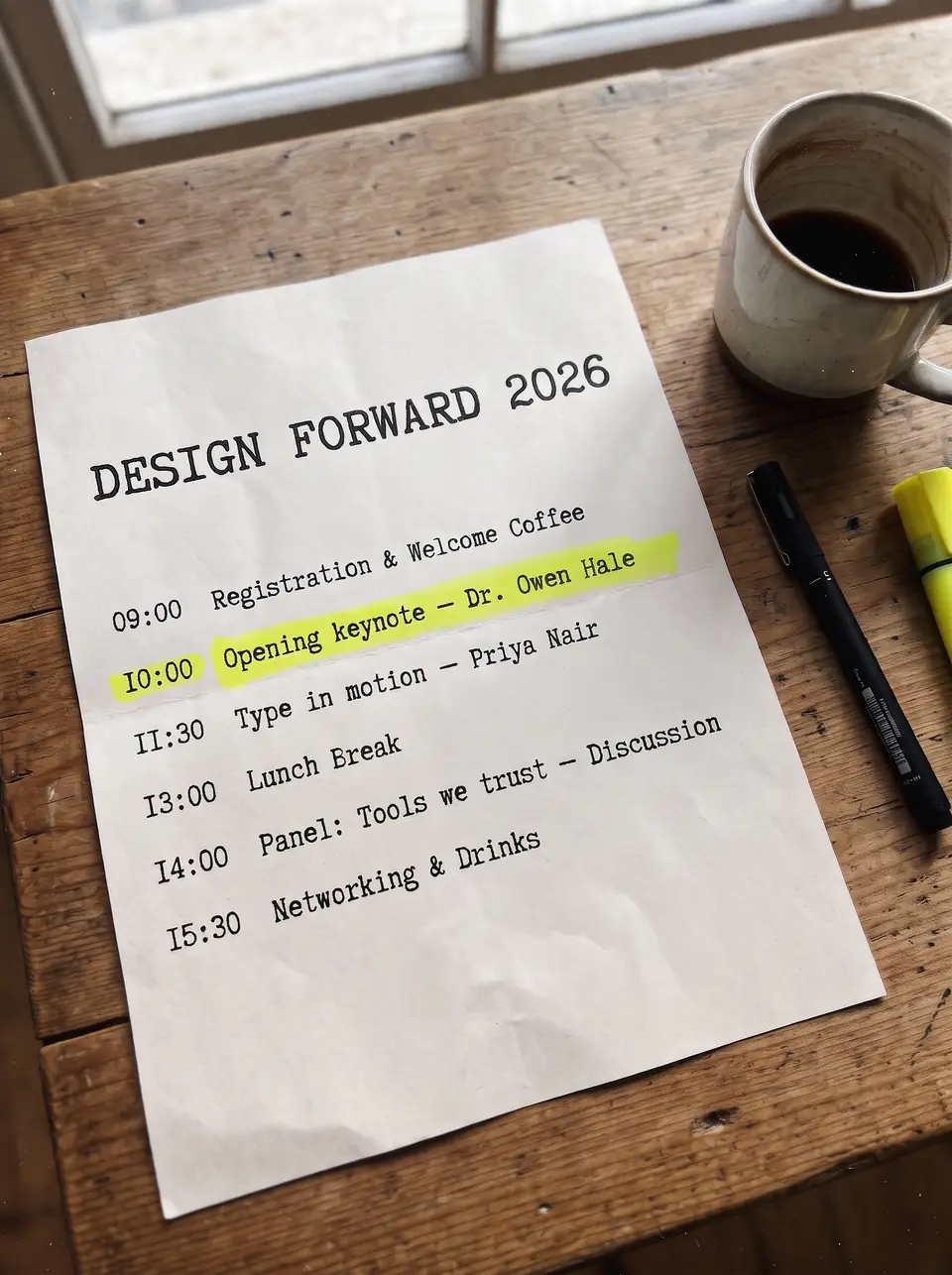
A fictional program needs a new keynote name. This earlier saved AI demonstration changes Dr. Elena Marsh to Dr. Owen Hale on the finished page. TextImageEdit takes the name and its replacement as the request; Photopea offers a repair-and-retype workflow if the name is flattened. Compare the letters, highlighted line and nearby schedule. This is our saved model example, not a Photopea output.
This earlier saved edit changes TASTY to ZESTY above three tacos on an orange background. The large purple lettering makes stroke shape, shadow and spacing easy to inspect. Use TextImageEdit to request a new word without supplying a font. Use Photopea when you want to set the font, effects and positioning yourself. Check the smaller script and food details before publishing either result.
Update a banner phrase, then catch the missing space
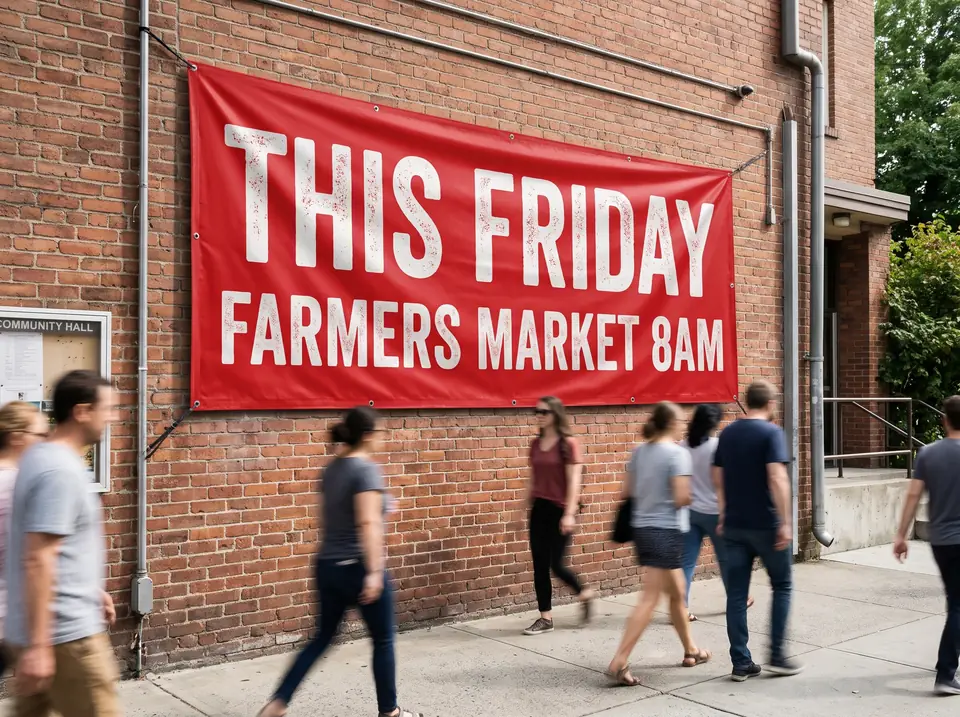
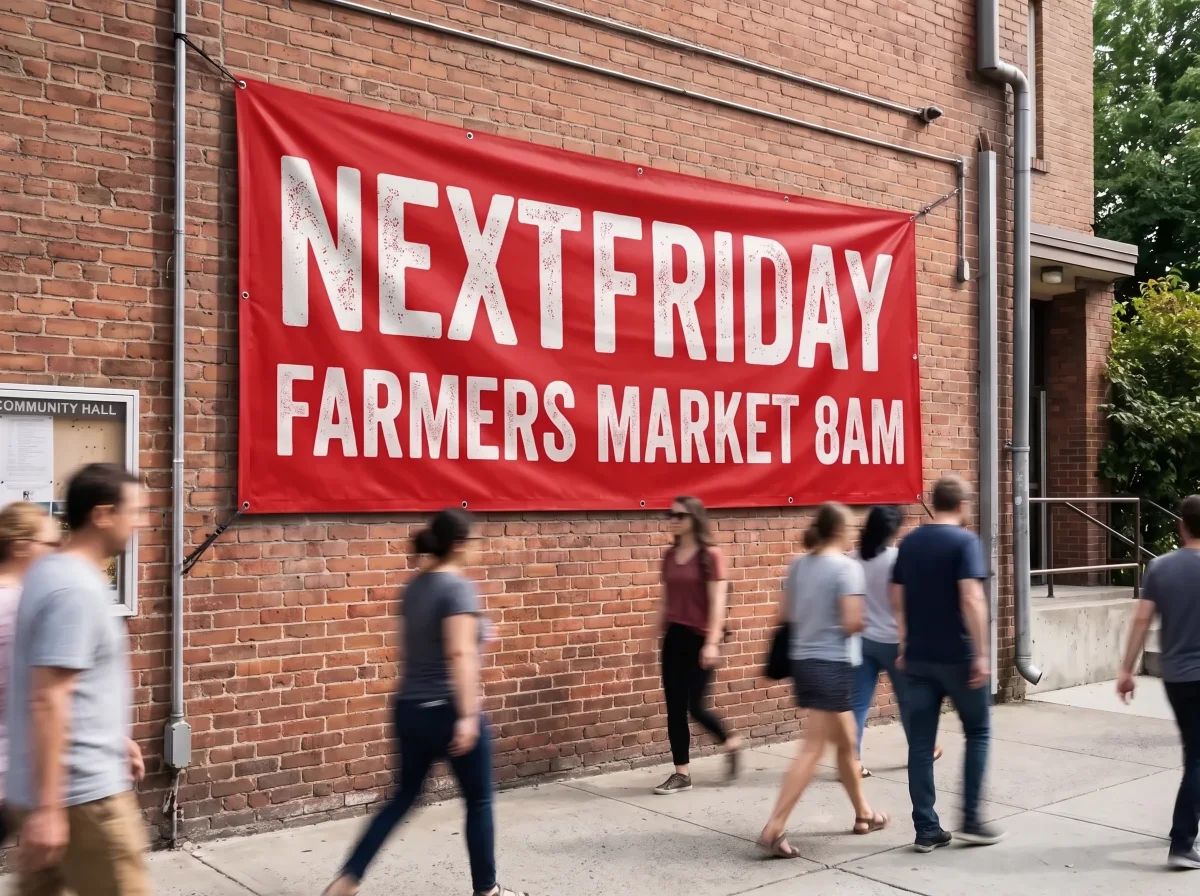
The request was THIS FRIDAY to NEXT FRIDAY. This saved provider result instead reads NEXTFRIDAY, with the space missing. The banner looks plausible, but the wording needs correction. Compare the actual letters as well as fabric folds, shadows and surrounding people. Photopea's healing and transformation controls provide a manual repair route; another generated edit is also a new request. This example is not an unqualified success or a Photopea comparison test.
THIS FRIDAY→NEXTFRIDAY
TextImageEdit vs Photopea: features and pricing
TextImageEdit is an independent product and is not affiliated with or endorsed by Photopea. This comparison describes documented workflows and our own demonstration edits; it is not a head-to-head performance benchmark. Competitor documentation reviewed 2026-11-01.
Scroll sideways to compare all columns.
TextImageEdit and Photopea: documented workflow comparison
Feature
TextImageEdit
Photopea
Free access and paid cost
No subscription. $14.90 USD buys 40 credits once — about $0.37 per 2K edit, before tax.
Basic editing is free with ads. Premium removes ads; check its current price in the Account window. Source ↗
Free edit and output
One verified-account free credit at 1K. Purchased credits use 2K. One replacement request uses one credit.
Save a PSD working file and export images in formats such as PNG or JPG, choosing export dimensions. Source ↗
Generation time
Product estimate: 30–60 seconds. Seven saved server jobs took 46–122 seconds; this is not a guaranteed duration. Test record ↗
Manual repair, editable-type changes and optional AI involve different steps; no timed comparison is claimed. Source ↗
Replace flattened words
Upload JPG, PNG or WebP up to 10 MB and enter original and replacement text.
The documented manual method removes old lettering, repairs the background and adds new type. Source ↗
Font handling
No font file needed; visible lettering guides the edit, without an exact-font guarantee.
Choose available fonts or load a TTF/OTF file through File > Open or drag-and-drop. Source ↗
AI features
A focused original-text and replacement-text generation workflow.
Includes AI features such as Magic Replace; API documentation also describes third-party integrations. Source ↗
Editing controls
Download a generated image, without reusable Type layers or masks.
Edit individual layers, text, opacity and masks; retain the structure in a PSD. Source ↗
Image processing
Online generation processes the uploaded image; check our privacy policy before sharing sensitive files. Test record ↗
Standard editing runs locally. Optional AI integrations can use third-party services and need separate consideration. Source ↗
Use TextImageEdit when you want to change the words and move on
You have the finished image and know what it should say. Upload it, enter the wording and generate a replacement without manually clearing letters, selecting a font or aligning a new text layer. That suits a speaker correction, a one-word ad variation or a small update to photographed text.
Keep the task focused and inspect the result before publishing. The program and taco ad show saved wording changes; the banner shows why exact proofreading still matters. You receive an image to review and download, not the original designer's editable project.
Use Photopea when you want free, hands-on design control
Photopea is a useful choice when your next revision needs editable type, layers, masks or a broader layout change. Open the original PSD if you have it; otherwise, repair flattened lettering and add a new Type layer. You can load your own TTF or OTF font directly into the editor.
Photopea works in a browser and recommends a larger screen, precise pointer and keyboard for comfort. Its standard editing runs on your device. Optional AI features have separate processing considerations, so check the feature you intend to use rather than treating every operation as offline.
Upload a JPG, PNG or WebP up to 10 MB, or load one of the three examples.
Enter the existing wording and the intended replacement. Preserve spaces, punctuation and capitalization.
Generate and compare with Show original. Proof the whole phrase, check nearby details, then download and inspect the actual file.
The honest trade-off: free editing or paid generation
Photopea's basic editor really is free. TextImageEdit sells a focused generation workflow, not a cheaper substitute for a free tool. Your choice depends on whether you want to reconstruct and control the edit yourself or submit the wording and review a generated image. Photopea also has AI, including Magic Replace.
One TextImageEdit replacement uses one credit; translation uses one per selected language. Failed generations return credits. A completed result submitted for another edit uses another credit, so allow for revisions. Compare the current packs below with Photopea's free access and optional Premium terms, including the working file you need afterward.
One-time credit packs (USD)
Starter $14.90 · 40 credits
Pro $26.90 · 100 credits
Studio $39.90 · 180 credits
The free credit uses 1K; purchased credits use 2K. Applicable taxes are shown at checkout.See pricing and details →
Can I correct a speaker's name in a flattened event program?+
Yes. TextImageEdit accepts the image and the old and new names. In Photopea, flattened letters need repair and new type unless you use an AI feature. If the program already has an editable Type layer, revise that directly. Check spelling and nearby schedule entries.
Do I need to install a font to edit the food-ad headline?+
TextImageEdit does not require a font file. Photopea offers font and text-style controls, and can load TTF or OTF files through File > Open or drag-and-drop. This does not require a blanket desktop-font installation step. Check your permission to use the font and artwork.
Can the editor change words on a textured banner?+
It can attempt the replacement, but inspect both wording and the photographed surface. Our saved banner request for NEXT FRIDAY produced NEXTFRIDAY. A plausible background does not make a missing space correct. Photopea's healing and transformation tools offer a separate repair workflow.
Are Photopea and TextImageEdit both free?+
Photopea's basic editor is free with ads; Premium removes ads. TextImageEdit gives a verified account one free 1K credit with a downloadable result and no added watermark. Additional credits are one-time purchases and use 2K. Our free allowance is not daily.
Does Photopea keep every editing operation on my device?+
Photopea documents standard editing as local. Its API also describes third-party AI integrations, so do not extend the local-editing statement to every optional AI operation. TextImageEdit uses online generation. Review the relevant policy and feature before processing confidential material.
Does Photopea have AI text or image editing features?+
Photopea includes Magic Replace and other AI features. This comparison distinguishes its documented manual text-repair workflow and broader controls from TextImageEdit's focused replacement form. It does not claim that Photopea lacks AI or that one tool always produces a better result.
Which option gives me editable layers for later revisions?+
Photopea supports Type layers, masks and PSD working files. Save the layered project before exporting a delivery image. TextImageEdit returns a generated image; placing it in a PSD afterward does not restore independent text layers or the original font settings.
What image should I download for publishing?+
Choose the format and dimensions your destination requires, then inspect the actual file. Photopea offers PSD saving and image exports. TextImageEdit's 1K and 2K settings do not guarantee a particular print size or preserve every input dimension. Keep your original file.
What if the replacement is longer or changes the spacing?+
Review line breaks, letter size and the full phrase. Photopea provides direct text sizing, paragraph and alignment controls. A generated edit may change the arrangement or miss a space, as the banner demonstrates. Do not treat exact typography or unchanged surrounding pixels as guaranteed.
Photopea privacy — Standard local processing and optional cloud storage.
Photopea API — Magic Replace and third-party integration settings.
Compare with an AI assistant
How should I compare Photopea and a dedicated image text editor for a speaker-name correction, decorative food-ad headline and photographed banner, including free access, font loading, AI features, privacy, editable layers and output checks?
Read this page as context: https://textimageedit.com/photopea-alternative
If you cannot access the page, say so rather than guessing its content.
The question includes this page's link. If it is not filled in, copy and paste it.
 TextImageEdit