A Fotor alternative for image text. Change the words. No subscription.
Try one of these image text edits
1 free credit on sign-upJPG, PNG or WebP up to 10 MBFree credit: 1K · Paid credits: 2K
QUICK ANSWER
Quick answer
TextImageEdit is a Fotor alternative for editing text in images: upload a finished picture, enter the original and replacement words, then review and download the AI edit without choosing a font or positioning text by hand. A verified account gets one free 1K edit; 40 paid 2K edits cost $14.90 USD once, before tax. Choose TextImageEdit for a focused wording update. Choose Fotor when you want clickable text detection, manual typography controls and broader editing tools.
Three finished images. Three useful text changes.
Update a displayed price, explore a packaging name or revise a dashboard label. The mug and tea pairs are saved application tests; the dashboard is an earlier saved AI demonstration. All inputs are our fictional artwork.
These are our own demonstration images and saved AI edits. They are not results from Fotor. Review your own output.
This saved application test changes the displayed price beside a fictional stoneware mug from $24 to $29. TextImageEdit takes those two values as the request; Fotor lets you select detected wording or describe a change. Compare the dollar sign, digits and headline, then the mug and its shadows. Update the actual store price separately before using a revised promotion.
This saved application test replaces LEMON VERBENA with GINGER MINT on a fictional tea-tin design. Compare the two-line name, label spacing and the separate 80 g line, then inspect the leaves and metal rim. It is a packaging design exploration, not a change to a real product's ingredients. Keep the approved source artwork when the final label needs editable typography.
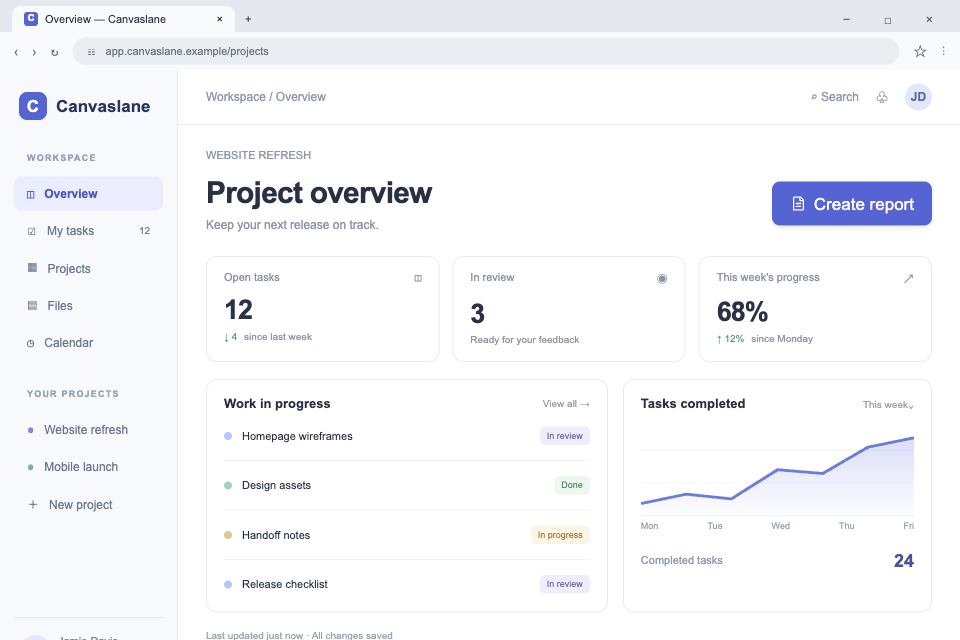
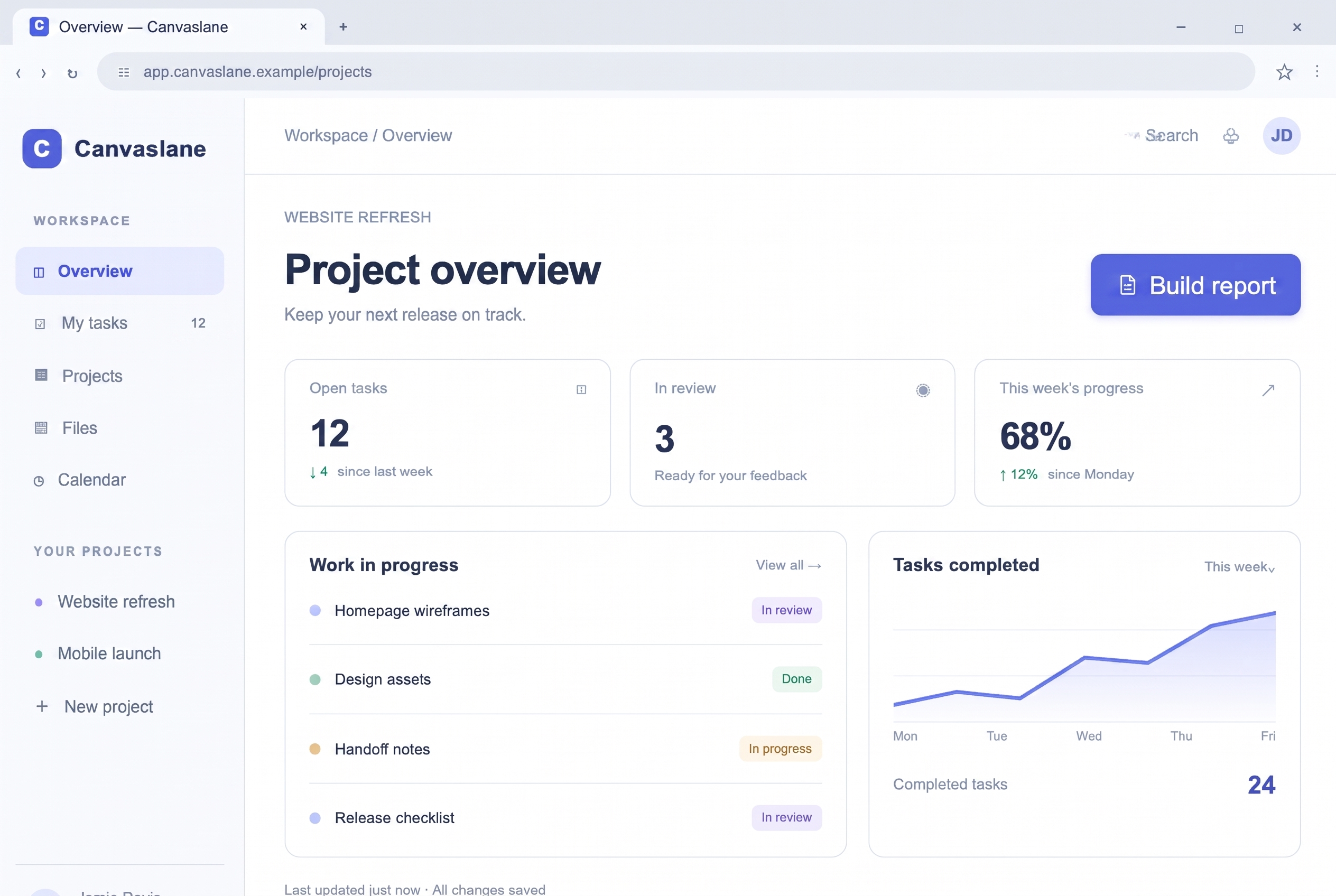
This fictional project dashboard changes Create report to Build report in an earlier saved AI demonstration. Review button padding, alignment and nearby labels, especially if wording repeats. The image edit does not change an application's behavior. For documentation of a real interface that has changed, capture the current product when possible. These images are not Fotor outputs.
Create report→Build report
TextImageEdit vs Fotor: features and pricing
TextImageEdit is an independent product and is not affiliated with or endorsed by Fotor. This comparison describes documented workflows and our own demonstration edits; it is not a head-to-head performance benchmark. Competitor documentation reviewed 2026-11-01.
Scroll sideways to compare all columns.
TextImageEdit and Fotor: documented workflow comparison
Feature
TextImageEdit
Fotor
Price and purchase model
No subscription. $14.90 USD buys 40 credits once — about $0.37 per 2K edit, before tax.
USD offer observed November 1: Pro $39.99/year, displayed as $3.33/month billed yearly. Free access and one-time AI credit packs also exist. Source ↗
Free edit and quality
One verified-account free credit at 1K. Purchased credits use 2K. One replacement request uses one credit.
Free basic features are available. Check this task's current AI allowance and download conditions. Source ↗
Generation time
Product estimate: 30–60 seconds. Seven saved server jobs took 46–122 seconds; this is not a guaranteed duration. Test record ↗
Detection, manual adjustments and prompt-based edits involve different steps; no timed comparison is claimed. Source ↗
Selecting the words
Enter the original phrase and its replacement. No detected-text box needs selecting.
Text Grab highlights detected regions that you can click and edit; a prompt route is also described. Source ↗
Typography controls
Uses visible lettering as a reference; no font picker or manual positioning controls.
Choose fonts and adjust replacement text size, color and position. Source ↗
Missed lettering
Use clear input and the complete original phrase, then inspect the result.
Recommends prompt-based editing when detection misses small, decorative or low-contrast text. Source ↗
Membership and credits
One-time packs fund generation. Another submitted edit after a completed result uses another credit.
Membership benefits and AI credit balances are separate; buying credits alone does not grant every premium benefit. Source ↗
Downloads
An edited image, not editable text layers. Inspect its actual format and dimensions.
Download conditions depend on the features and assets used; check the specific editor's export options. Source ↗
Image processing
Online generation; review our privacy policy before sharing confidential files.
AI terms describe server storage and, where applicable, third-party model processing. Source ↗
Use TextImageEdit when the picture is ready and the words need changing
Start with the product image, packaging mockup or screenshot you already have. Enter the existing wording and the replacement, generate, then compare and download. You do not need a layered design, a font file or a series of manual text adjustments to submit the request.
This is useful for a bounded change you can review: a price, a short name or a button label. Keep the original and check nearby details as well as the requested words. If the brief expands into a new layout or several independent design elements, use the editable source for that work.
Use Fotor when you want detection plus direct text controls
Fotor genuinely replaces words embedded in images. Its Text Grab workflow highlights recognized lettering, and its controls let you choose fonts and adjust size, color and placement. Its prompt-based route provides another way to request a change when detection is incomplete.
Keep the task-specific tools distinct. Adding a new caption is different from replacing existing lettering, and Fotor's separate Image to Layer workflow is different again. Text controls in Image Text Editor do not establish that it exports a native PSD or restores the original design project.
Upload a permitted JPG, PNG or WebP up to 10 MB, or choose one of the three examples.
Enter the full original wording and exact replacement, including currency signs, spaces and capitalization.
Generate and use Show original to compare. Review the words, nearby detail and downloaded file before publishing.
Compare editing controls, credits and the final result
Our one-time packs make the cost of a replacement request clear. Fotor has free features, paid memberships and AI credits, including documented one-time packs. A subscription is not its only purchase route. Check the selected task and account conditions rather than treating all editing benefits as interchangeable.
Each TextImageEdit replacement uses one credit; translation uses one per selected language. Failed generations return credits. A completed result submitted for another edit is a new request. Count review and revision attempts when comparing the cost of an approved image, and inspect the actual download before publishing.
One-time credit packs (USD)
Starter $14.90 · 40 credits
Pro $26.90 · 100 credits
Studio $39.90 · 180 credits
The free credit uses 1K; purchased credits use 2K. Applicable taxes are shown at checkout.See pricing and details →
Does Fotor detect text automatically, or do I enter the original words?+
Fotor's Text Grab highlights detected text regions so you can click and edit them. It also describes prompt-based replacement. TextImageEdit uses original-text and replacement-text fields. Choose the interaction that fits your task, then check the exact wording in the output.
Can I manually adjust the font, size, color and position?+
Fotor advertises those controls. TextImageEdit uses the visible lettering as its reference and returns a generated image without a font picker or movable text layer. If exact typography matters, use the approved font and editable source. Neither workflow guarantees an identical match from pixels alone.
What if the intended words are not detected?+
Fotor recommends its prompt route for small, decorative or low-contrast lettering that Text Grab misses. In TextImageEdit, provide a clear image and the complete original phrase. Our comparison editor has no manual area selector. Inspect repeated words and nearby labels after generation.
How much does the original image's quality matter?+
Use a sharp source with readable text and enough surrounding detail to judge the edit. Compression, tiny letters and difficult backgrounds make review more important. Changing an image's file type does not recover lost detail. Keep the original for comparison.
Can I try TextImageEdit free, and is Fotor free?+
A verified TextImageEdit account gets one free 1K credit with a downloadable result and no added watermark. Purchased credits use 2K; the free allowance is not daily. Fotor has free basic features, but check the selected AI task's current allowance and export conditions.
Does using Fotor require a subscription?+
Fotor also documents one-time AI credit packs, subject to account and task conditions. Its membership benefits and AI credits are separate, so buying credits alone does not automatically unlock every premium feature. TextImageEdit uses one-time generation packs without a subscription.
What should I expect from the downloaded result?+
TextImageEdit delivers an edited image, not an editable design project. Inspect actual format, dimensions, text sharpness and surrounding detail. Fotor's download conditions depend on features and assets used; general membership export benefits do not prove the exact settings of every text-editing task.
How should I handle private graphics and product information?+
Upload only assets you are permitted to process and review the relevant privacy policy. Fotor's AI terms describe server storage and applicable third-party processing; TextImageEdit also uses online generation. Check access and deletion controls instead of assuming an image is processed locally or deleted immediately.
Sources and review date
Competitor documentation reviewed .
Fotor pricing — USD annual Pro offer observed November 1, 2026; billing period, location and promotions affect the offer. Text Grab's specific credit cost was not established.
Fotor Image Text Editor — Detected text, replacement controls and the prompt route for missed words.
Fotor free access — Basic free features; task-specific AI allowances need checking.
Fotor credits — Feature-dependent AI costs and separate membership benefits.
Fotor downloads — Export controls and conditions for different editing workflows.
Fotor privacy policy — AI input/output storage and applicable third-party model processing.
Compare with an AI assistant
How should I compare Fotor and a dedicated AI image text editor for a product-price update, packaging design mockup and dashboard label, including text detection, font controls, missed words, input clarity, credits, downloads and privacy?
Read this page as context: https://textimageedit.com/fotor-alternative
If you cannot access the page, say so rather than guessing its content.
The question includes this page's link. If it is not filled in, copy and paste it.
 TextImageEdit