 TextImageEdit
Free, no sign-upAbout 1,200 Google FontsVisual match score
What font is this? To find out, upload the image to Font Finder and draw a box around one line of text. An AI model reads the words and estimates the style, such as serif or script, weight and width. TextImageEdit then renders the same words in matching Google Fonts and ranks them by how closely their letter shapes match yours. Every result is a free font with an open-source license that allows commercial use. Identification is free, with no sign-up.
Real font finder results
Three runs on our own fictional graphics, with the top three free matches. Each preview below is the real Google Font.
POSTER HEADLINE
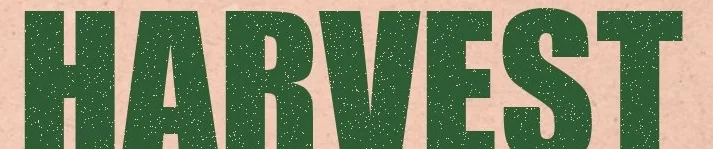
Read as “HARVEST” · heavy bold condensed sans, all caps
- HARVESTBarlow Condensed 900 · 95%
- HARVESTSmooch Sans 900 · 90%
- HARVESTAnton 400 · 83%
A textured, heavy condensed headline from a fair poster. The top matches are condensed grotesques at their heaviest weights; Anton, which the model also suggested, ranked fifth.
PRICE TAG
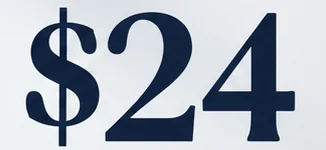
Read as “$24” · very heavy serif numerals
- $24Playfair 900 · 80%
- $24Lora 600 · 77%
- $24Vollkorn 700 · 77%
A high-contrast serif price on a product graphic. Font Finder suggests high-contrast and transitional serifs; Playfair at its black weight comes closest.
AD TAGLINE

Read as “THIS WEEKEND ONLY” · bold all-caps sans
- THIS WEEKEND ONLYNunito 600 · 84%
- THIS WEEKEND ONLYIBM Plex Sans 600 · 84%
- THIS WEEKEND ONLYManrope 600 · 83%
A clean tagline under a soda ad. Many geometric and neo-grotesque sans fonts look alike at this size, so several matches score within a few points; compare letters such as W, K and Y.
How to identify a font from an image
- Upload a JPG, PNG or WebP: a logo, poster, product label, screenshot or photo of a sign. Or try a sample.
- Drag a box around one line of text. A tight box around a single style gives the best matches.
- Select Find font. Compare the free Google Fonts lookalikes, ranked by visual match, then open the one you want on Google Fonts.
How Font Finder matches fonts
Naming a font from a picture is hard even for designers, and AI models that only describe an image often guess well-known names that do not match. Font Finder uses the model for what it does reliably: reading the words and judging the style, for example a heavy condensed sans or a high-contrast serif. Candidates are then taken from the Google Fonts catalog by category, weight and slant.
Your browser renders the same words in each candidate and compares the letter shapes with your selection, after trimming both to the ink and scaling them to the same height. The percentage is that measured overlap combined with how wide the word is for its height. It is a guide for comparing candidates, not a probability that the font is identical.
When the match is close, and when it is not
Clean, large lettering on a plain background works best: headlines, logo wordmarks, labels and screenshots. Texture, heavy shadows, outlines, curved or rotated text and very small type make the letter shapes harder to compare, so box a single line and keep the box tight.
Many logos and posters use commercial fonts or custom lettering. In that case the results are the closest free alternatives, which is often what you need for a mockup, a social post or a similar design. If you need the exact original, ask the designer or check the brand's guidelines.
What Font Finder does
- Best for. Headlines, logos, posters, product labels, menus and screenshots with clear, large lettering.
- Accepted input. One JPG, PNG or WebP image. Only the boxed area is sent for reading.
- What you get. Up to eight Google Fonts lookalikes with a visual match score, a preview in your colors and a link to download.
- Cost. Free, no account. There is a daily limit per visitor to keep the service available.
- Limits. Results come from about 1,200 Latin-script Google Fonts families. A paid or custom font will get its closest free lookalike, not its own name.
FAQ — font finder
What font is this, and how do I find out?
Upload a screenshot or photo of the text to this font identifier, box one line and select Find font. It compares your letters with real Google Fonts and lists the closest matches with a score, a preview and a download link.
What is the best free font identifier?
A good font identifier compares the actual letter shapes rather than guessing a name. Font Finder is free with no sign-up and only returns fonts that exist in the Google Fonts catalog. Commercial font databases such as WhatTheFont or Font Squirrel's Matcherator cover paid fonts too, so try one of them if you need the exact commercial name.
How do I find out what font is in an image?
Upload the image to Font Finder, drag a box around one line of the text and select Find font. You get up to eight free Google Fonts ranked by how closely their letters match the text in your box, each with a preview and a link to download it.
Is Font Finder free?
Yes. Identifying fonts is free and needs no account. Each visitor has a daily limit so the service stays available for everyone. Editing text inside images is a separate paid tool.
Can it tell me the exact font name?
Only when the font is a Google Font, because results come from that catalog of about 1,200 Latin-script families. For commercial or custom fonts it shows the closest free lookalikes instead of the original name.
Are the matched fonts free for commercial use?
Google Fonts are released under open-source licenses, mostly the SIL Open Font License, which allow commercial use. Check the license shown on each font's Google Fonts page before you use it in a product.
What does the match percentage mean?
It is a measured visual similarity between your selected text and the same words rendered in that font, after both are scaled to the same height. Use it to compare candidates. A higher score means closer letter shapes and proportions, not a guarantee that it is the same font.
Why are my results not close?
The box may include several lines, other words or background detail, or the lettering may be textured, outlined, curved or hand-drawn. Draw a tight box around one line, use a larger and sharper image, and try a different line if the image has several fonts.
Can it identify fonts in a logo?
Yes, box the wordmark. Many logos use commercial or custom lettering, so expect close free alternatives rather than the exact font.
Does it work with handwriting and script fonts?
It can suggest script and handwriting fonts, but connected or hand-drawn letters vary a lot, so matches are less precise than for print-style lettering.
Which languages does it support?
This version is built for Latin-script text such as English, Spanish, French, German and Portuguese. Other scripts are not supported yet.
Is my image uploaded?
Only the area inside your box is sent, as a small image, to read the words and style. It is processed to produce your results and is not saved to your account or used to train models.
How do I change the text but keep the same font?
Use Edit text in image with the same font. It changes the words inside your picture and keeps the existing lettering style, so you do not need to install the font.
What font is this? Find out free.
Upload an image, box one line of text and compare the closest free fonts.
Find a font →