 TextImageEdit
Typography
What Font Is This? How to Identify a Font from an Image
To find out what font is in an image, upload a clear crop of one line of the text to a font identifier. It compares the letter shapes with a font library and lists the closest matches. Free tools such as TextImageEdit's Font Finder search free Google Fonts; commercial tools such as WhatTheFont search paid font catalogs too. If nothing matches closely, the text is probably a custom or modified font, and the best you can get is a close lookalike.
Below are three real Font Finder results from our own graphics, run on November 12, 2026, followed by the tools to try and the habits that get better matches.
Three real results
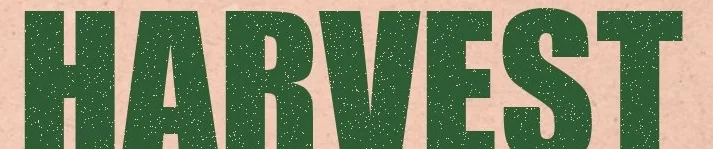
Poster headline, "HARVEST". Read as a heavy, condensed, all-caps sans. Top matches: Barlow Condensed Black (95%), Smooch Sans Black (90%) and Anton (83%). Condensed grotesques at their heaviest weight are the right family; the texture on the letters lowers every score a little.
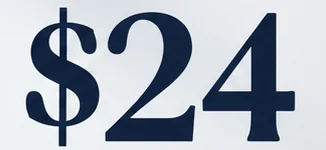
Price tag, "$24". Read as very heavy serif numerals. Top matches: Playfair Black (80%), Lora SemiBold (77%) and Vollkorn Bold (77%). Scores are lower because two digits and a dollar sign give the tool few shapes to compare. More letters mean better matches.

Ad tagline, "THIS WEEKEND ONLY". Read as a bold all-caps sans. Top matches: Nunito SemiBold (84%), IBM Plex Sans SemiBold (84%) and Manrope SemiBold (83%). Many clean sans fonts look alike at this size. When scores are within a few points, compare distinctive letters such as W, K and Y yourself.
How font identifiers work
Older font finders asked you to confirm each letter, then matched outlines against their catalog. Newer ones, including Font Finder, read the text automatically, estimate the style (serif or sans, weight, width, slant) and render the same words in candidate fonts to compare shapes. The percentage is a visual similarity score, not the probability that it is the same font.
Two things limit every tool:
- The catalog. A free tool can only name fonts it knows. If the image uses a paid font, a free-font identifier gives the closest free alternative; a commercial identifier may find the exact name.
- The lettering. Logos are often custom-drawn or modified fonts, so no catalog has them.
Font identifiers to try
| Tool | Searches | Cost | Good for |
|---|---|---|---|
| Font Finder | About 1,200 Google Fonts families | Free, no sign-up | Free lookalikes you can use commercially |
| WhatTheFont (MyFonts) | Large commercial catalog | Free to identify | Finding the exact paid font |
| Font Squirrel Matcherator | Commercial and free fonts | Free | A second opinion |
| Adobe Fonts visual search | Adobe Fonts library | Free to search, fonts with Creative Cloud | Creative Cloud users |
| Community forums such as r/identifythisfont | Human experts | Free | Custom or obscure lettering |
Try two tools when the first result looks off. Different catalogs give different answers.
How to get a better match
- Crop one line of text. Mixed fonts in one crop confuse every tool.
- Use the sharpest, largest version of the image you have. Screenshots beat photos; photos beat compressed social images.
- Straighten it. Rotated, curved or angled text matches poorly.
- Avoid effects where you can: outlines, heavy shadows and textures change the letter shapes.
- Include distinctive letters. g, a, R, Q, W and numbers separate similar fonts far better than O, I or l.
When there is no exact match
- Pick the closest free alternative for mockups, social posts and quick designs. Font Finder only returns open-licensed Google Fonts, so you can download and use them.
- Ask the source. For a brand, check its brand guidelines or press kit, or ask the designer.
- Change the words without finding the font. If you only need different text in the same image, an image text editor that keeps the same font redraws new words in the existing style, with no font file needed.
Frequently asked questions
What font is this in my screenshot?
Crop one line from the screenshot and upload it to a font identifier. App interfaces usually use system fonts such as San Francisco (Apple), Roboto (Android) or Segoe UI (Windows), so check those first.
Is there a free font identifier?
Yes. Font Finder is free with no sign-up and returns free Google Fonts. WhatTheFont and Font Squirrel's Matcherator are also free to use.
Can I identify a font from a photo?
Yes, if the letters are large and in focus. Shoot straight on, crop to one line, and avoid glare.
Why do different tools give different answers?
Each searches its own catalog and compares shapes differently. A free-font tool cannot return a paid font's name, so it suggests the nearest free one.
Are the matched fonts free to use commercially?
Google Fonts use open-source licenses, mostly the SIL Open Font License, that allow commercial use. Fonts found in commercial catalogs usually need a paid license.
Sources and method
The three crops come from our own fictional graphics. Results were produced on November 12, 2026, with TextImageEdit's Font Finder (AI reading of the text and style, then in-browser comparison against Google Fonts), and are the top three of eight returned. Scores can vary slightly between runs. Third-party tool descriptions are based on their public pages in November 2026.
Try the workflow
Choose a clear image you can edit, prepare the new wording and compare the downloaded result.
Open the font finder →